• Updated:
  • Featured post

How LLMs get their probabilities for the next token

(este post es una explicación de la teoría. dejo aquí otro post con el detalle práctico de como usar la temperature, top_k y top_p a efectos prácticos)

Explicación más en detalle de cómo obtienen los LLMs las probabilidades para generar el siguiente token

Sampling

En cada posición el modelo tiene una bolsa con miles de tokens posibles. Sampling es el proceso de no coger siempre el token más probable, si no de orientarlo a coger respuestas con determinadas características.

Si el modelo escogiera siempre el token con más probabilidades, obtendríamos respuestas aburridas y repetitivas.

Logits

Para generar el siguiente token, una red neuronal calcula primero los vectores de logits, donde cada logit corresponde a un valor posible. El tamaño de estos vectores de logits es tan grande como el vocabulario completo del modelo.

(representación de vectores de logits)

flowchart LR
	N1["What's your favorite color?"]:::note --> Z
	Z --> A1 --> A
	Z --> B1 --> B
	Z --> C1 --> C
	Z --> D1 --> D
	
	Z["Neural network"]
    A["a"]
    A1["(-0.5)"]
    B["green"]
    B1["(0.7)"]
    C["red"]
    C1["(0.5)"]
    D["the"]
    D1["(-1.2)"]
    
    classDef note fill:none,stroke:none,color:#777;    

Los logits NO representan probabilidades ya que no suman 1 y pueden incluso ser negativos (la probabilidades no pueden). Para convertir logits a probabilidades se usa una Softmax layer

Temperature

La temperatura es una constante que se aplica a los logits antes de la transformación de la Softmax layer. Se usa para ajustar la creatividad del modelo y redistribuir la probabilidad de los valores. Una temperatura más alta hace que el modelo sea más creativo ya que aumenta las posibilidades de elegir tokens menos probables.

xychart-beta
  title "Temperatura vs Probabilidad"
  x-axis "Temperatura (T)" [0.1, 0.2, 0.5, 1, 2, 5]
  y-axis "Probabilidad" 0 --> 1
  line "P(token1)" [0.9999546, 0.9933071, 0.8807971, 0.7310586, 0.6224593, 0.5498340]
  line "P(token2)" [0.0000454, 0.0066929, 0.1192029, 0.2689414, 0.3775407, 0.4501660]

Ejemplos de temperaturas:

  • Low (0.2-0.3): El modelo es cauto y elige las palabras más probables. Output factual y predecible.
  • Medium (0.5-0.7): Un mix de confiabilidad y engagement
  • High (0.9-1.0): Toma riesgos y es impredecible
Read More

AI-200: Azure AI Cloud Developer Associate

(los posts aquí contenidos han sido creados (y contienen imágenes oficiales) siguiendo los cursos oficiales self-paced de learn.microsoft.com AI-200. Para más información recomiendo seguir los mismos cursos)

status: in progress

Contents

Develop containerized solutions on Azure (20-25%)

  • Implement container application hosting
  • Implement container-orchestrated solutions

Develop AI solutions by using Azure data management services (25-30%)

  • Develop AI solutions by using Azure Cosmos DB for NoSQL
  • Develop AI solutions by using Azure Database for PostgreSQL
  • Intwegrate Azure Managed Redis in AI solutions

Connect to and consume Azure services (20-25%)

  • Develop event- and message-based AI solutions
  • Develop and implement Azure Functions

Secure, monitor, and troubleshoot Azure solutions (20-25%)

  • Implement secure Azure solutions
  • Monitor and troubleshoot Azure solutions

Microsoft official learning paths

Microsoft Foundry IQ

Microsoft Foundry IQ es una managed knowledge layer para agentes y aplicaciones de IA.

Conecta datos (tanto estructurados como no estructurados) de empresa y datos de la web en bases de conocimiento reutilizables.

Usa agentic retrieval para devolver información relevante y permission-aware con sus referencias.

Es una capa más que tenemos disponible para nuestros agentes

  • Los modelos permiten a los agentes razonar
  • Las tools les permiten ejecutar acciones
  • El Knowledge les otorga información que no está en sus datos de entreno
Componente Proposito
Knowledge base Top level resource. Identifica una colección de Knowledge sources y controla su comportamiento. Acepta prompts de sistema para establecer prioridades o de donde sacar los datos para cada query.
(Ejemplo: Azure AI Search Service)
Knowledge source Una conexión a contenido indexado o remoto.
(Ejemplo: SP, Azure SQL DDBB, Azure Storage, etc.)
Agentic retrieval Retrieval process. En el prompt al agente se le debe indicar cuando debe usar la base de conocimiento.

Read More

Text analysis in Azure (& MCP)

Text analysis es el proceso de extraer información útil de un bloque de texto no estructurado mediante NLP como puede ser:

  • sentiment analysis (positivo, neutral, negativo)
  • entities
  • topics

Text Analysis in Microsoft Foundry

En Foundry tenemos dos aproximaciones para text analysis:

  • modelos generalistas de IA con objetivos muy amplios mediante NLP
  • Tools específicas que devuelven resultados deterministas para tareas muy específicas

Modelos de IA generalistas

Podemos usarlos directamente out-of-the-box para:

  • Key phrase extraction: listar los conceptos principales
  • Entity linking: identificar entidades y linkearlas a Wikipedia
  • Sentiment analysis and opinion mining: identificar si es positivo, neutral o negativo
  • Summarization: resumir la información principal

Los modelos generalistas se recomiendan cuando necesites aplicar varias de estas técnicas a la vez

Azure Language in Foundry Tools

Azure Language is a NLP service for specific text analysis tasks. These analyzers return structured, deterministic output - making them well-suited for automated pipelines where we want consistent results.

Azure Language capabilities:

  • Language detection: evaluates text and detects language and dialect
  • Personal Identifying information (PII) detection (also PHI - health information)

Language detection

given this text

¡Hola! Me llamo Josefo y vivo en Madrid, España

we would get

Language ISO 6391 code Confidence score
Spanish es 1.00

PII detection

given this text

“Maria Garcia called from 020 7946 0958 and asked to send documents to 42 Market Road, London, UK, SW1A 1AA.”

we would get

Text Category
Maria Garcia Person
020 7946 0958 Phone number
42 Market Road, London, UK, SW1A 1AA Address

Use Azure Language with an Agent

AI agents use models as its brain to reason and plan, and they also use tools to perform tasks, which are added as MCP servers.

Model Context Protocol (MCP)

Open standard que define como se conectan los agentes de IA a tools externas y data sources. MCP es un universal adapter para poder conectar agentes a MCP servers que exponen unas capacidades de una manera standard.

MCP usa una arquitectura cliente-servidor

  • El MCP client es el agente de IA que envía requests.
  • El MCP server es el servicio que expone tools, datos o acciones.

Cuando un agente se conecta a un servidor MCP, puede descubrir que tools ofrece ese servidor e invocarlas como necesite.

Un MCP server puede responder a una petición:

  • Providing data (give sentiment scores)
  • Taking action (process a batch of documents)

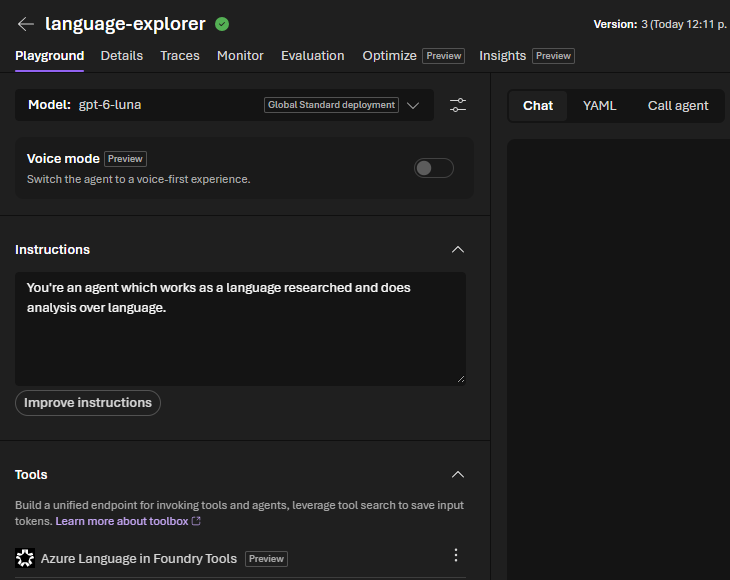
Build your agent in Foundry

Some regions may not be supported for some MCP servers. It happened to me with Azure Language MCP and Spain Central

  1. Deploy a model
  2. Create new agent
  3. Select the deployed model
  4. Give instructions to the agent
  5. Linked the previously created tools (Azure Language)
  6. Give a prompt and test

test analysis agent

Client application to analyze text (python)

Let’s create an application that uses the OpenAI Python SDK. For that we need to have created before:

  • a Foundry resource
  • a Foundry project

Install the main library

pip install openai

Create a config file .env

AZURE_OPENAI_ENDPOINT=https://<your-resource>.openai.azure.com/openai/v1/
MODEL_DEPLOYMENT_NAME=gpt-4.1-mini
API_KEY=<your-foundry-key>

Create the app logic

import os
from dotenv import load_dotenv
from openai import OpenAI

# Load environment variables from .env file
load_dotenv()
endpoint = os.getenv("AZURE_OPENAI_ENDPOINT")
api_key = os.getenv("API_KEY")
deployment_name = os.getenv("MODEL_DEPLOYMENT_NAME")

# Create the client object
client = OpenAI(
    base_url=endpoint,
    api_key=api_key
)

# Make a request using the client
message = client.responses.create(
    model=deployment_name,
    input="",
)

# Print the results
print(f"Sentiment: {message.output[0]}")

Use the Azure Language SDK

Install it

pip install azure-ai-textanalytics

Adapt the config

AZURE_LANGUAGE_ENDPOINT=https://<your-resource>.cognitiveservices.azure.com/
API_KEY=<your-foundry-key>

App code for language detection

# Import packages
import os
from dotenv import load_dotenv
from azure.core.credentials import AzureKeyCredential
from azure.ai.textanalytics import TextAnalyticsClient

# Load environment variables from .env file
load_dotenv()
endpoint = os.getenv("AZURE_LANGUAGE_ENDPOINT")
key = os.getenv("API_KEY")

# Create the client
client = TextAnalyticsClient(endpoint=endpoint, credential=AzureKeyCredential(key))

# Make a request using the method for LANGUAGE DETECTION
text = "¡Hola! Me llamo Josefina y vivo en Madrid, España."
result = client.detect_language([text])[0]

# Print the results
print(f"Language      : {result.primary_language.name}")
print(f"ISO code      : {result.primary_language.iso6391_name}")
print(f"Confidence    : {result.primary_language.confidence_score:.2f}")

Or if we modify the method called, for PII

# Make a request using the method for PII
text = "Maria Garcia called from 020 7946 0958 and asked to send documents to 42 Market Road, London, UK, SW1A 1AA."
result = client.recognize_pii_entities([text])[0]

# Print the results
print("Redacted text:", result.redacted_text)
print("\nEntities found:")
for entity in result.entities:
    print(f"  {entity.text} | category={entity.category} | confidence={entity.confidence_score}")

Speech in Azure

We split speech in two capabilities:

  • Speech recognition (speech-2-text)
  • Speech synthesis (text-2-speech)

Speech recognition (speech-2-text)

Speech-to-text software includes multiple models

  • An acoustic model that converts audio into phonemes
  • A language model that maps phonemes to words

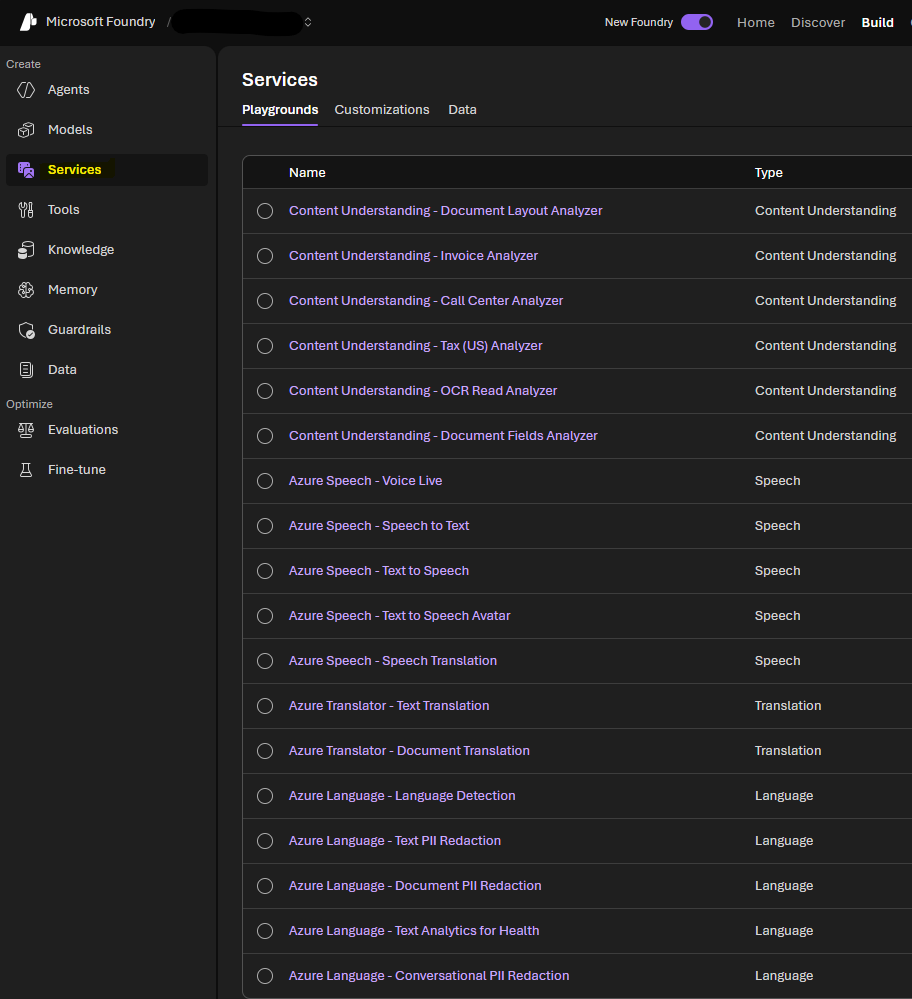
Go to Build > Services and there we can choose the one we want to use

speech Azure

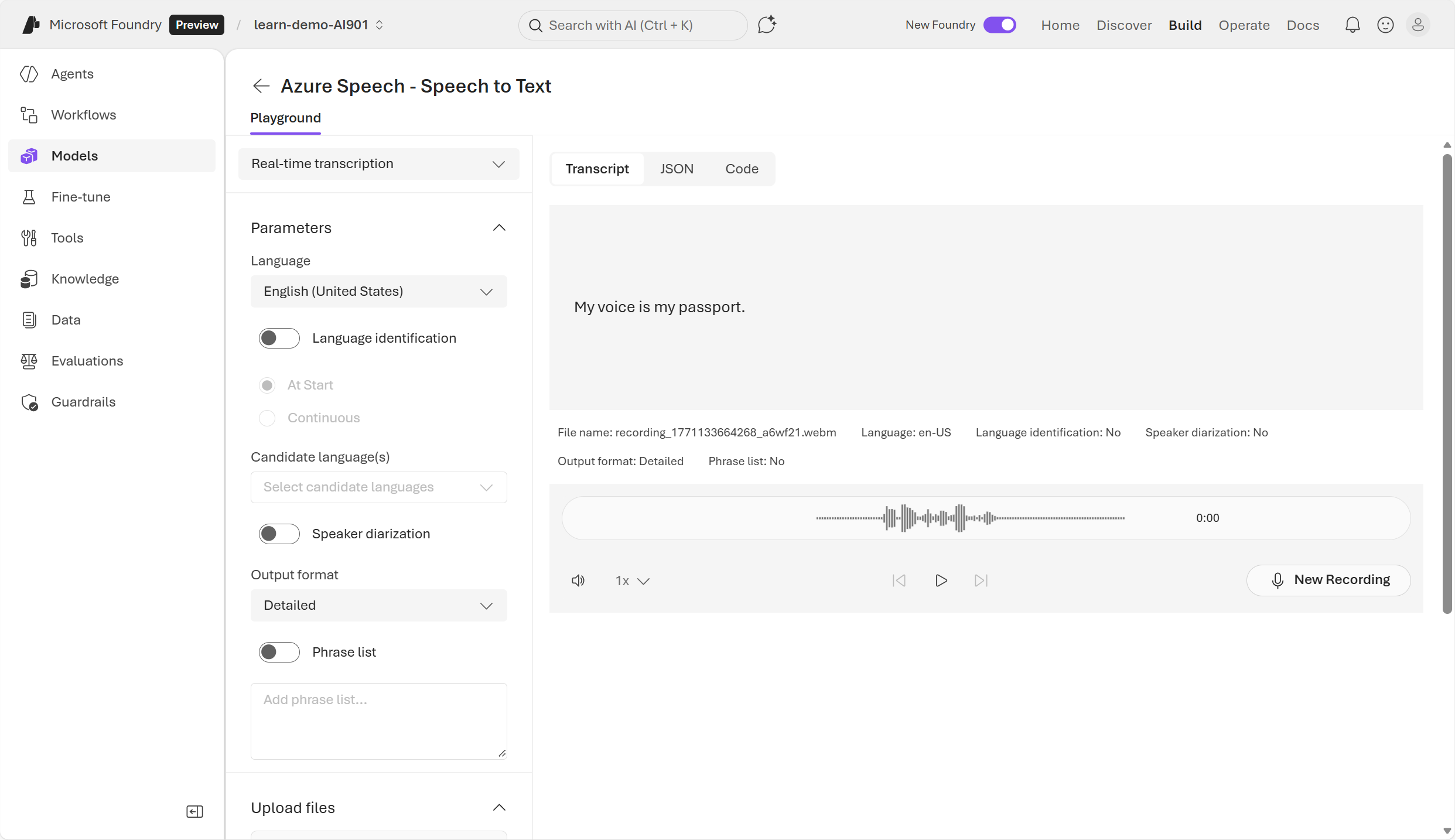
Then if we open Speech-to-text, you can speak there and test the service

speech to text example

Azure speech-to-text SDK

It’s also possible to use it through the SDK for application’s usage.

Install the SDK

pip install azure-cognitiveservices-speech

App code

import azure.cognitiveservices.speech as speechsdk

# Set up the speech config using resource endpoint
endpoint_url = "ENDPOINT"
speech_key = "FOUNDRY_KEY"

speech_config = speechsdk.SpeechConfig(
    subscription=speech_key,
    endpoint=endpoint_url
)

# Create a recognizer with microphone input
audio_config = speechsdk.audio.AudioConfig(use_default_microphone=True)
speech_recognizer = speechsdk.SpeechRecognizer(
    speech_config=speech_config, 
    audio_config=audio_config
)

# Event handlers
def recognized_handler(evt):
    print(f"Recognized: {evt.result.text}")

def recognizing_handler(evt):
    print(f"Recognizing: {evt.result.text}")

# Connect event handlers
speech_recognizer.recognized.connect(recognized_handler)
speech_recognizer.recognizing.connect(recognizing_handler)

# Start continuous recognition
speech_recognizer.start_continuous_recognition()
print("Say something...")

# Keep the program running
input("Press Enter to stop...")
speech_recognizer.stop_continuous_recognition()

When using the SDK it’s possible to perform real-time or batch transcription of audio which work as async jobs with audios you’ve saved.

Batches usually should be immediate but they work on a best-effort basis. Normally they start within minutes of the request but this is NOT guaranteed

Speech synthesis (text-2-speech)

A text-to-speech solution usually requires:

  • the text to be spoken
  • the voice to be used to vocalize the speech

To synthesize speech the system typically:

  1. Tokenizes the text to break it down into individual words
  2. Breaks the phonetic transcription into prosodic units (such as phrases, clauses or sentences)
  3. Creates phonemes from the prosodic units
  4. The phonemes are synthesized as audio and can be assigned a particular voice, speaking rate, pitch and volume

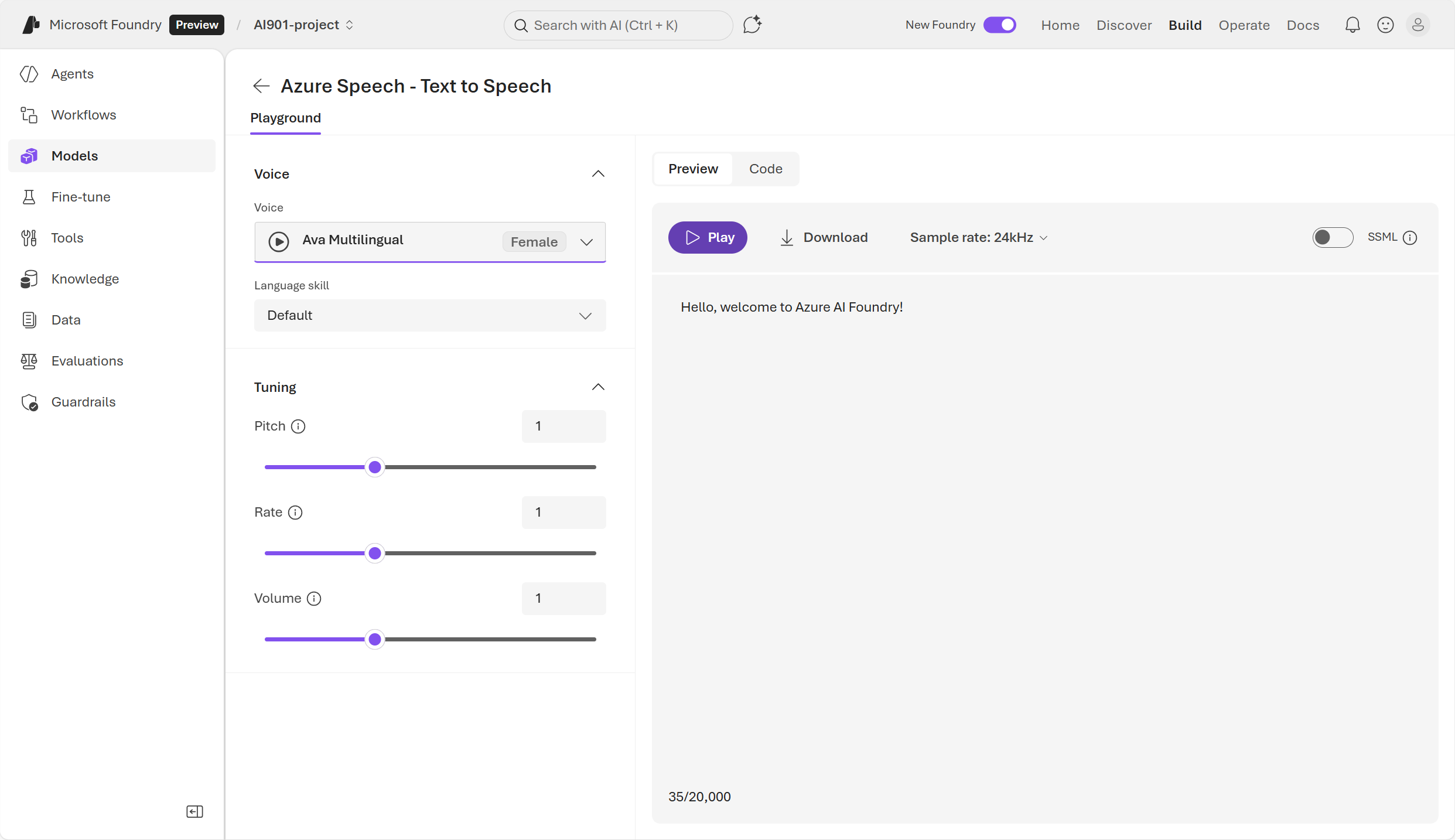
text to speech example

Azure text-to-speech SDK

code example

import os
import azure.cognitiveservices.speech as speechsdk

# This example requires environment variables named "FOUNDRY_KEY" and "ENDPOINT"
speech_config = speechsdk.SpeechConfig(subscription=os.environ.get('FOUNDRY_KEY'), endpoint=os.environ.get('ENDPOINT'))
audio_config = speechsdk.audio.AudioOutputConfig(use_default_speaker=True)

# The neural multilingual voice can speak different languages based on the input text.
speech_config.speech_synthesis_voice_name='en-US-Ava:DragonHDLatestNeural'

speech_synthesizer = speechsdk.SpeechSynthesizer(speech_config=speech_config, audio_config=audio_config)

# Get text from the console and synthesize to the default speaker.
print("Enter some text that you want to speak >")
text = input()

speech_synthesis_result = speech_synthesizer.speak_text_async(text).get()

if speech_synthesis_result.reason == speechsdk.ResultReason.SynthesizingAudioCompleted:
    print("Speech synthesized for text [{}]".format(text))
elif speech_synthesis_result.reason == speechsdk.ResultReason.Canceled:
    cancellation_details = speech_synthesis_result.cancellation_details
    print("Speech synthesis canceled: {}".format(cancellation_details.reason))
    if cancellation_details.reason == speechsdk.CancellationReason.Error:
        if cancellation_details.error_details:
            print("Error details: {}".format(cancellation_details.error_details))
            print("Did you set the speech resource key and endpoint values?")

Crear un agente speech-capable

Azure Speech incluye un VoiceLive Service el cual permite construir agentes conversacionales. Esta API permite tener conversaciones en tiempo real.

VoiceLive Service API reune todo para que el agente pueda escuchar y pueda responder.

agente capaz de speech

Esto también se puede usar programáticamente mediante el SDK

pip install azure-ai-voicelive

Computer vision in Azure

Modelos multimodales para análisis de imagen

Cada vez hay más modelos multimodales los cuales aceptan ambos textos e imágenes. Esto reduce la necesidad de tener vision pipelines separadas.

Foundry soporta el uso de modelos multimodales desde la web (Azure OpenAI API).

Azure OpenAI SDK (python)

Instalar el sdk

pip install openai

Ejemplo de código

import os
from openai import OpenAI

# Environment variables you set locally or in your app service:
FOUNDRY_KEY = "... your key ..."
ENDPOINT = "https://YOUR-RESOURCE-NAME.openai.azure.com/openai/v1/"
MODEL_NAME = "your-model-deployment-name"  # e.g., "gpt-4.1-mini" deployed as "my-vision-deploy"

client = OpenAI(
    api_key=os.getenv("FOUNDRY_KEY"),
    base_url=os.getenv("ENDPOINT"),
)

image_url = ""

response = client.responses.create(
    model=os.getenv("MODEL_NAME"),  # your deployment name 
    input=[
        {
            "role": "user",
            "content": [
                {"type": "input_text", "text": "What is in this image? Provide 3 bullet points."},
                {"type": "input_image", "image_url": image_url}
            ],
        }
    ],
)

print(response.output_text)

Generación de imágenes

Foundry contiene modelos especiales para generación de imagen

  • GPT-Image-1.5
  • GPT-Image-1
  • GPT-Image-1-Mini

Todos estos modelos se pueden usar desde Foundry o con el SDK

OpenAI SDK

Código App

import os
import base64
from openai import OpenAI

# Required environment variables (example names)
FOUNDRY_KEY="..."
ENDPOINT="https://YOUR-RESOURCE-NAME.openai.azure.com/openai/v1/"
MODEL_NAME="your-gpt-image-deployment-name"  # e.g., "gpt-image-1"

client = OpenAI(
    api_key=os.environ["FOUNDRY_KEY"],
    base_url=os.environ["ENDPOINT"],
)

prompt = "A modern flat illustration of a robot holding a potted plant, clean vector style, pastel colors."

response = client.responses.create(
    model=os.environ["MODEL_NAME"],  # your deployment name in Foundry
    input=prompt,
    tools=[{"type": "image_generation"}],
)

image_base64 = next(
    item.result for item in response.output
    if item.type == "image_generation_call"
)

with open("foundry_generated.png", "wb") as f:
    f.write(base64.b64decode(image_base64))

print("Saved: foundry_generated.png")

Generación de videos

Foundry contiene modelos especiales para generación de imagen

  • Sora 2
  • Sora 1

REST interface

Se puede usar la REST interface para integrar el servicio de generación de videos con una aplicación

ejemplos curl

crear video

curl -X POST "https://YOUR-RESOURCE-NAME.openai.azure.com/openai/v1/videos" \
  -H "Content-Type: application/json" \
  -H "api-key: $AZURE_OPENAI_API_KEY" \
  -d '{
    "model": "sora-2",
    "prompt": "A cinematic close-up of raindrops sliding down a neon-lit window at night.",
    "size": "1280x720",
    "seconds": "8"
  }'

poll status

curl -X GET "https://YOUR-RESOURCE-NAME.openai.azure.com/openai/v1/videos/{video_id}" \
  -H "api-key: $AZURE_OPENAI_API_KEY"

download video

curl -L "https://YOUR-RESOURCE-NAME.openai.azure.com/openai/v1/videos/{video_id}/content?variant=video" \
  -H "api-key: $AZURE_OPENAI_API_KEY" \
  --output output.mp4

Information Extraction with AI (Azure Content Understanding)

Extract information from documents

Azure Content Understanding

LEARN what Azure Content Understanding is and how it works

Azure Content Understanding goes beyond simple OCR text extraction. It follows a schema-based extraction of fields and values.

It follows this workflow

  1. Ingest content
  2. AI-powered analysis: The services analyzes the content through combination of
    • OCR
    • speech recognition
    • NLP/NLU
    • multimodal AI models
  3. Structured output - returns for example JSON

Understand analyzers

Un analyzer es una unidad de Azure Content Understanding la cual:

  • toma input
  • aplica analisis mediante IA
  • produce un resultado estructurado

Una vez estructurado un analyzer se encarga de que un schema sea reusado de manera consistente para cada request. Un analyzer produce resultados predecibles en JSON.

Azure Content Understanding ofrece prebuilt analyzers o se pueden customizar. A alto nivel:

  1. Eliges o creas un analyzer
  2. El analyzer incluye un schema que define los campos y su estructura
  3. Adjuntas contenido para ser analizado
  4. El servicio aplica el schema
  5. Recibes JSON de vuelta que concuerda con el schema

Read More

Understand Azure

Azure provee de 4 categorías de servicios:

  • Compute: run applications or workloads in the cloud
  • Storage: it lets you save and manage data in the cloud
  • Networking: tools that connect your cloud resources to each other, the internet or your organization
  • App Services: IaaS / PaaS

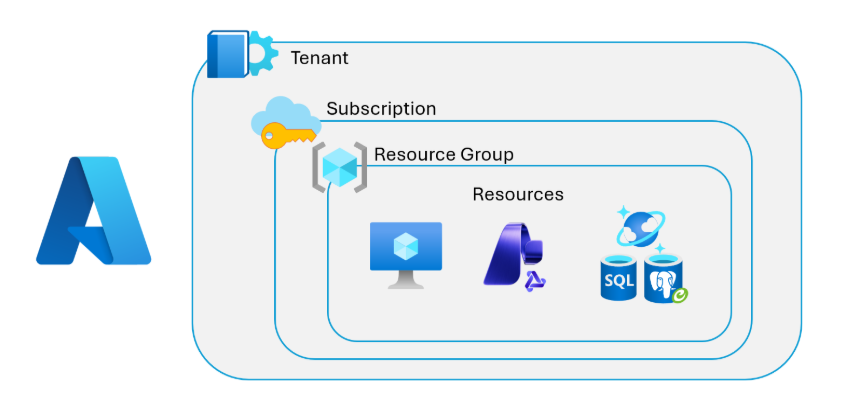
Estructura organizacional de Azure

(Azure se organiza en)

embeddings representation

Tenants

Un tenant es la base de una organización en Azure Cloud. Microsoft crea un tenant cuando una compañía se registra en Azure y cada tenant es independiente de otros.

El tenant incluye:

  • users
  • groups
  • identidades
  • policies

Read More

Microsoft Foundry for AI

Microsoft Foundry es un PaaS unificado para construir, administrar y hacer deployment de AI apps y agentes. Consolida modelos, orquestación de agentes, monitoring y governanza en una plataforma.

Foundry ofrece muchas capacidades, incluyendo el elegir uno de muchos modelos, usar estos modelos para construir agentes, conectar esos agentes a herramientas e integrar knowledge usando Foundry IQ (punto de acceso centralizado para data sources)

microsoft foundry

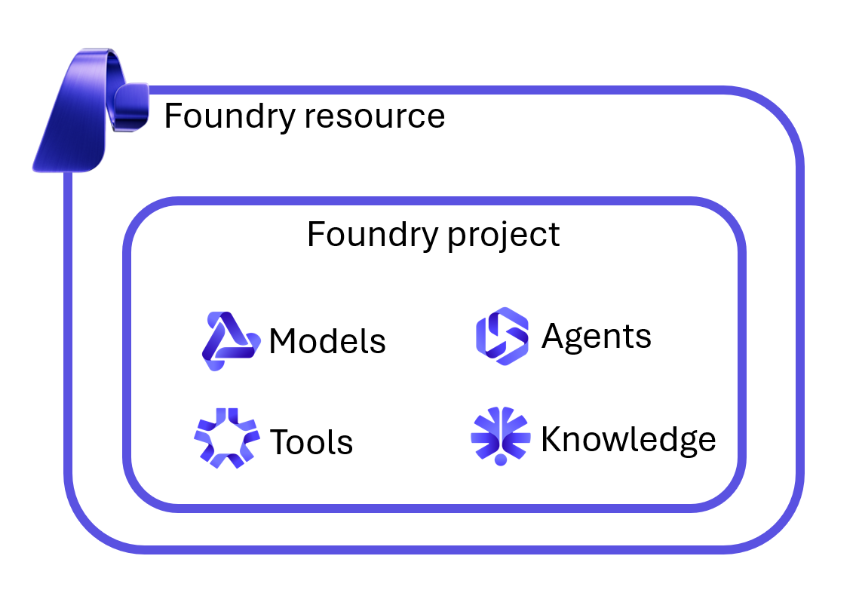
Foundry resources and projects

Para empezar con Foundry hay que crear un Foundry resource, el cual provee de acceso a:

  • modelos
  • agent service
  • deployment governance
  • monitoring and observability
  • security boundaries
  • quotas and operational controls

Un Foundry project es un workspace dentro de ese resource donde construyes AI apps, agentes y evaluaciones:

  • agentes
  • evaluaciones
  • files and datasets
  • vector indexes
  • flows (AI logic)
  • connections
  • project-specific settings

De normal tenemos un Foundry resource para un equipo o departamento, y muchos Foundry projects dentro, cada uno enfocado a un caso de uso de IA distinto

Read More

GenAI Models in Foundry

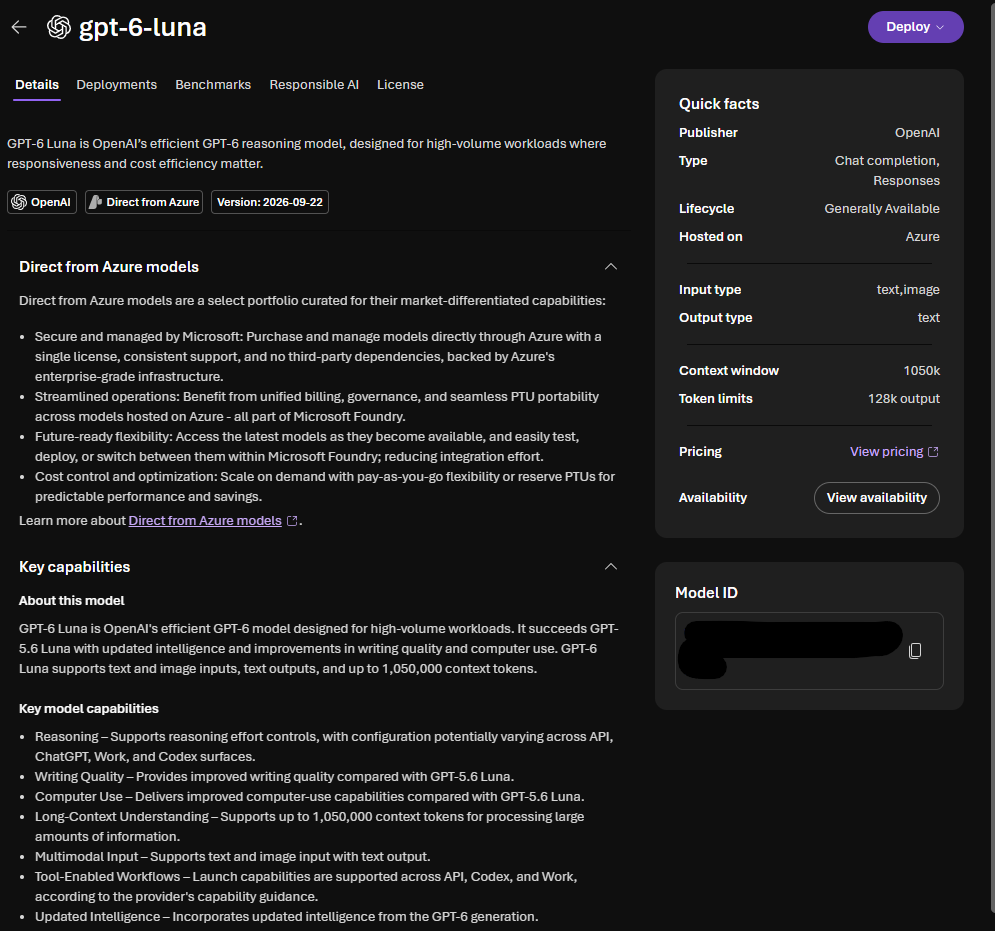
Microsoft Foundry has a model catalog that includes various model types

  • Models sold directly by Azure: models hosted directly by Microsoft. High integration with Azure and SLAs / compliance
  • Models from Partners and the Community: includes open-source or vendor-hosted models. They support broader experimentation and innovation.

Each model entry includes:

  • description and capabilities
  • Benchmark results and performance comparison against other models
  • Supported inference tasks and fine-tuning options
  • Responsible model AI documentation

model description

LEARN THIS definition:

Foundation models are large, pretrained models that provide general language, reasoning or multimodal capabilities out of the box. These models can be deployed immediately or customized through fine-tuning, and serve as the base layer for building AI apps.

Read More

Agents in Foundry

Los agentes son aplicaciones que usan la IA generativa. La IA agentica se aleja de prompts individuales y en vez de eso define comportamientos consistentes (workflows) que se pueden reutilizar a través de aplicaciones y servicios.

Un agente en Foundry consta de:

  • Modelo: el cerebro
  • Instrucciones: system prompt que define su rol, comportamiento, estilo, constricciones y output
  • Tools: acciones que el agente puede realizar

Los agentes pueden:

  • Llamar external tools (APIs, funciones, retrieval) por su cuenta
  • Estructurar tareas paso a paso
  • Tener memoria de una conversación
  • Procesar user input, decidir acciones y generar output estructurado

Crear un agente en Foundry

  1. Elegimos que modelo queremos usar
  2. Escribimos el system prompt
  3. Añadimos tools
  4. Añadimos knowledge

Add Tools

Las Tools en Foundry permiten a un modelo ejecutar acciones llamando a sistemas externos. Representan acciones ejecutables (navegar internet, query a BBDD, usar un MCP server)

  • Code interpreter
  • Custom APIs

En Foundry las tools forman la base de las acciones para los agentes. Se pueden configurar centralmente en el Foundry Tool Catalog

Read More