Posts Tagged - csharp

.NET Index

Introduction to .NET

VStudio

Visual Studio (shortcuts & debug)

meta

C# coding style
Code documentation in c#
Middleware

config

Launchsettings vs appsettings
User secrets

C# “basics”

Introduction to c#
c# methods
c# classes
Partial classes
Deconstruction
c# collections (lists, tuples…)
c# collections’ index and range operators

C#

Nullables
Class vs struct vs record (reference types vs value types)
Expression bodied members
Pattern matching
Generics

news in C#

C# 12
Collection expressions
Primary constructors
Lambda’s default values

C# 11
Raw string literals

lists and lambdas

Linq examples
Anonymous methods & lambda expressions
Delegates

async / await (TAP programming)

Async programming
Async best practices
Async with parallelism
Async with lambdas

advanced

Parallel code
Servicebus vs Queue
Streams and Files
Anonymous type objects
Events (pub/sub)

Razor Pages

Basic usage
Prevent Overposting

web API

Basic health checks
How to get headers
Caching
Validations
Newtonsoft
Dependency injection (& scope types)
Dependency injections with multiple implementations

testing

Setup testing with XUnit/NUnit, FluentAssertions, Moq & branch coverage
NUnit test examples for c#
XUnit test examples for c#
Mock multiple method calls with the same param type

.NET with AI

Integrate .NET with AI

(ORM) Entity Framework Core

Teoria EF Core
EF Core Scaffolding
EF Core Global Filters
Read-only statements performance improvement
Data models
EF Core multithreading

Read More

Razor Pages - Prevent Overposting

Si las clases contienen secretos, aunque estos no se muestren en la web, hay maneras de introducir datos en un Creation aunque el form no tenga un campo para ello.

Ejemplo de clase con secretos Student.cs

public class Student
{
	public int ID { get; set; }
	public string LastName { get; set; }
	public string FirstMidName { get; set; }
	public DateTime EnrollmentDate { get; set; }
	
	// an atacker may set a Secret on creation ...
	public string Secret { get; set; }
	// ... or he may enroll the Student in Courses he shouldn't
	public ICollection<Enrollment> Enrollments { get; set; } = [];
}

Hay varias alternativas para evitar esto:

  • Usar ViewModels
  • Usar TryUpdateModelAsync

ViewModels

Una buena práctica es usar ViewModels (se puede meter en la misma Student.cs)

public class StudentVM
{
	public int ID { get; set; }
	public string LastName { get; set; }
	public string FirstMidName { get; set; }
	public DateTime EnrollmentDate { get; set; }
}

Y operamos a través del ViewModel en las vistas para crear un nuevo Student, por lo que no pueden meter un secreto ni otras relaciones.

[BindProperty]
public StudentVM StudentVM { get; set; }

public async Task<IActionResult> OnPostAsync()
{
	if (!ModelState.IsValid)
	{
		return Page();
	}
	
	var entry = _context.Add(new Student());
	entry.CurrentValues.SetValues(StudentVM);
	await _context.SaveChangesAsync();
	return RedirectToPage("./Index");
}

Para que esto funcione las clases no tienen porque estar relacionadas, pero sus properties si que tienen que ser iguales.

Read More

Razor Pages - Basic Usage

Automate CRUD creation

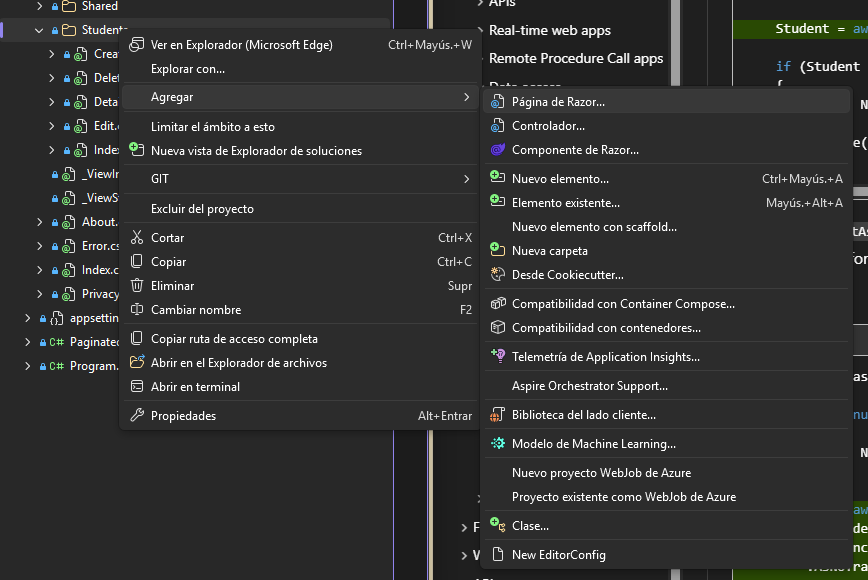
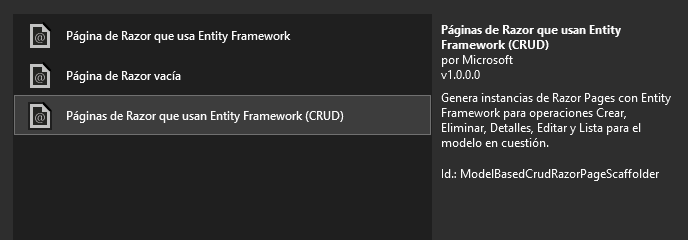
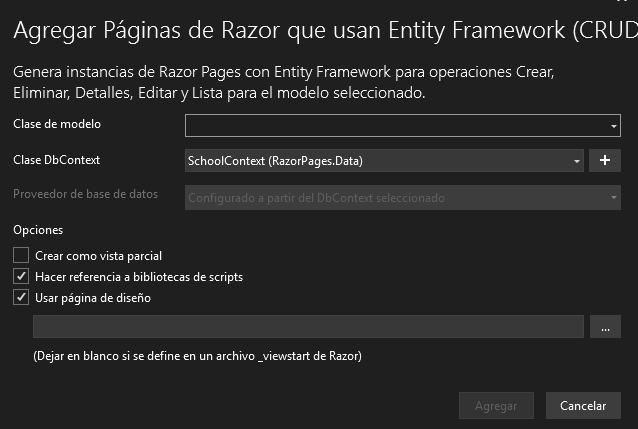
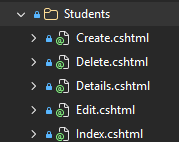
Con Visual Studio es posible automatizar la creación de CRUDs y sus vistas.

Click derecho > agregar > Página de Razor Cursor overview

Páginas de Razor que usan Entity Framework (CRUD) Cursor overview

Seleccionamos todos los datos necesarios Cursor overview

Esto crea todas sus vistas y código necesario Cursor overview

Read More

C# parallelize code

Example on how to write parallel code

public List<string> ProcessX(CancellationToken cancToken = default)
{
	// sequential code
	// ...
	
	// list that we want to be able to process faster
	List<Animal> animals = // ... 
	
	// multithread safe collection
	var animalsDTO = new ConcurrentBag<AnimalDTO>();
	var options = new ParallelOptions
	{
		CancellationToken = cancToken,
		MaxDegreeOfParallelism = GetMaxDegreeOfParallelism()
	};
	
	Parallel.ForEach(animals, options, animal => 
	{
		// process single animal
		// this is just an example to map animal to animalDTO
		// ...
		animalsDTO.Add(Map(animal));
	});
}

private int GetMaxDegreeOfParallelism()
{
	string configured = config["ANIMALS_PARALLELISM"] ?? "4";
	int degree;
	if(!int.TryParse(configured, out degree))
	{
		degree = 4;
	}
	return degree;
}

Read More

C# User Secrets

Never store passwords or sensitive data in source code or configuration files. Production secrets shouldn’t be used for development or test. Secrets shouldn’t be deployed with the app. Production secrets should be accessed through a controlled means like Azure Key Vault.

Secret manager

This tool hides implementation details. The secret values are stored in a JSON file in the local machine’s user profile folder.

This tool operates on project-specific configuration settings and (!) it’s only meant for local development (!). Don’t use it for production as it’s not encrypted.

To use user secrets, run the following command in the project directory

dotnet user-secrets init

You can do this through visual studio Right click on your project inside vstudio > Administrar secretos de usuario

Set a new secret

Define an app secret containing a key > value

dotnet user-secrets set "OpenAI:ApiKey" "sk-xxxx"

Read More

.NET AI integration

Today’s AI landscape moves so fast and providers differ so much that vendor lock-in can become expensive. You need a clean, testeable way to add AI without tying your architecture to one SDK.

The solution to this problem is a model-agnostic solution.

Nuggets to use (you need to click “see preliminar versions”):

  • Microsoft.Extensions.AI - This nugget implements IChatClient interface, which is an abstraction to use several LLM providers, from ChatGPT to Ollama.
  • Microsoft.Extensions.AI.OpenAI
  • OllamaSharp (previously Microsoft.Extensions.AI.Ollama)

You’ll need to go to Open AI platform to set up a project, billing, and get an openAI API key.

This repository is a test implementation which connects to OpenAi’s ChatGPT and is able to send prompts.

Best Practices

  • Keep inputs short and specific
  • Validate outputs with regex/JSON schema. Reject or re-ask when invalid
  • Log prompts, token counts, latency and provider responses
  • Improve cost ops. Cache results, batch requests and prefer smaller models by default
  • Don’t commit or send secrets or personal information
  • Failover. Implement timeouts, retries, and fallback models
  • LLMs are stateless; maintaining and reconstructing conversational context is a developer’s responsibility (chat history or memory abstractions)

Security

  • prompt injection: beware with malicious prompts to subvert model guardrails, steal data or execute unintended actions
  • LLMs may leak private or internal data via crafted prompts
  • Training data poisoning may be injected by malicious actors
  • DoS and rate limiting: prevent overuse / abuse

Reference(s)

https://roxeem.com/2025/09/04/the-practical-net-guide-to-ai-llm-introduction/
https://roxeem.com/2025/09/08/how-to-correctly-build-ai-features-in-dotnet/

Read More

EF Core multithreading

I’ve had issues with EF Core when operating with multiple threads and with multiple calls at the same time.

The most important things to check are:

  1. The DbContext is not being shared between calls or threads
  2. All classes which have the context inyected must be scoped (not singleton)
  3. If working with async methods, you need to await calls

I have the following service

public class PersonService(AppDbContext _context)
{
	public async Task<Person> GetPerson(string id)
	{
		return await context.Persons.Find(id);
	}
}

which I may configure as follows

// if I inject it as singleton, this would cause exceptions on multiple calls
services.AddSingleton<IPersonService, PersonService>

// we have to inject it as scoped so it creates a context new for each call
services.AddScoped<IPersonService, PersonService>

Read More

Caching in .NET (IMemoryCache)

.NET offers several cache types. I’m going to explore here IMemoryCache which stores data in the memory of the web server. It’s simple but not suitable for distributed scenarios.

first of all we need to register the services

builder.Services.AddMemoryCache();

GetOrCreateAsync

here’s how you can inject and use it, without manipulating the cache itself

public class PersonService(IMemoryCache _cache)
{
	private const string CACHE_PERSON_KEY = "PersonService:GetPerson:";

	public async Task<Person> GetPerson(string id)
	{
		return await _cache.GetOrCreateAsync(CACHE_PERSON_KEY + id, async entry =>
		{
			entry.AbsoluteExpirationRelativeToNow = TimeSpan.FromMinutes(5);
			return await GetPersonNoCache(id);
		});
	}

	public async Task<Person> GetPersonNoCache(string id)
	{
		// do operations to get a person here
	}
}

Read More

C# Async await with parallelism

The following is an example where we need to call and await an external API multiple times inside an iteration.

I’m using myFakeAPI from postman for this example and one of their Car response look like this

public class CarResponse
{
	public CarDto Car { get; set; }
}

public class CarDto
{
	public int Id { get; set; }
	public string Car { get; set; }
	public string Car_Model { get; set; }
	public string Car_Color { get; set; }
	public int Car_Model_Year { get; set; }
	public string Car_Vin { get; set; }
	public string Price { get; set; }
	public bool Availability { get; set; }
}

Then this is the method which does call and mapping

private async Task<CarResponse> ExecuteCall(string id)
{
	string combinedUrl = URL + id;

	using var response = await _httpClient.GetAsync(combinedUrl);
	response.EnsureSuccessStatusCode();

	string json = await response.Content.ReadAsStringAsync();
	return JsonConvert.DeserializeObject<CarResponse>(json);
}

Control

This is the control version where we launch and await the tasks one at a time

// DON'T DO THIS
private async Task<List<CarResponse>> Control()
{
	List<CarResponse> carList = [];
	foreach (string id in _idsList)
	{
		CarResponse singleCar = await ExecuteCall(id);
		carList.Add(singleCar);
	}
	return carList;
}

Task.WhenAll()

It’s the most simple one - all tasks are launched at the same time. It’s ideal when we don’t have limits as we have no control over the simultaneous number of calls

// simple but what if we'd have +100 calls?
private async Task<List<CarResponse>> TaskWhenAll()
{
	var getCarsTask = _idsList.Select(ExecuteCall);
	var cars = await Task.WhenAll(getCarsTask);
	return cars.ToList();
}

Parallel.ForEachAsync()

This gives us the most control over number of parallel calls. It’s more complex.

private async Task<List<CarResponse>> ParallelForEachAsync()
{
	// this is a secure collection for multiple threads
	var carsBag = new ConcurrentBag<CarResponse>();
	var options = new ParallelOptions { MaxDegreeOfParallelism = 5 };

	await Parallel.ForEachAsync(_idsList, options, async (id, ct) =>
	{
		CarResponse car = await ExecuteCall(id);
		carsBag.Add(car);
	});
	return carsBag.ToList();
}

Read More

C# general utils

Enumerable

This is useful for testing, in case we want to fill a list with numbers f.e. from 1 to 200, so we don’t need to write it explicitely ourselves.

List<string> _idsList = Enumerable.Range(1, 200)
	.Select(n => n.ToString())
	.ToList();

Read More

C# generics

Example on how to use generics in C#

public class AnimalService(IConnectorService _service)
{
	public async Task<List<T>> GetAnimals<T> (List<string> ids, string query)
	{
		List<T> results = [];
		var request = new ConnectorRequest
		{
			query = query,
			ids = ids
		};
		response = await _service.Execute(request);
		if((response?.result?.Count ?? 0) > 0)
		{
			results = JsonConvert.DeserializeObject<List<T>>(response.result);
		}
		return results;
	}
}

Read More

C# JSON tags Newtonsoft

JsonConvert.SerializeObject

I use this to serialize full objects to log them with all their properties

InputModel x = // ...
log.LogInfo($"doing x. input: {JsonConvert.SerializeObject(x)}");

JsonProperty and NullValueHandling

This is useful for cases where we need to modify the given properties of a class we serialize and give back, but for any reason we don’t want to change the internal structure or naming.

With NullValueHandling we may omit in the JSON a variable in case it’s null.

public class House
{
	public List<Window> windows { get; set; };
	
	[JsonProperty("builtInGarage"), NullValueHandling = NullValueHandling.Ignore]
	public Garage garage { get; set; }; 
}

Read More

C# How to get headers

This is how to retrieve headers from any call.

// how to retrieve a mandatory header
if(Request.Headers.TryGetValue("mandatory-header", out var mandatoryHeader))
{
	// this one may be either filled or empty
	string optionalHeader = Request.Headers["optional-header"];
	var result = await _service.DoWork(mandatoryHeader, optionalHeader)
}
else 
{
	// log error as mandatory-header isn't included in the call
}

Read More

C# Task async programming (TAP) and parallel code

The core for asynchronous programming are the objects Task and Task<T>. Both of them are compatible with the keywords async and await.

First of all we need to identify if the code’s I/O-bound or CPU-bound.

  • the code’s limited for external operations and waits for something a lot of time. Examples of this are DDBB calls, or a server’s response. In this case we have to use async/await to free the thread while we wait
  • the code does a CPU-intensive operation. Then we move the work to another thread using Task.Run() so we don’t block the main thread.

async code vs parallel code

(!) Asynchronous code is not the same as parallel code (!)

  • In async code you are trying to make your threads do as little work as possible. This will keep your app responsibe, capable to serve many requests at once and scale well.
  • In parallel code you do the opposite. You use and keep a hold on a thread to do CPU-intensive calculations

async code

The importante of async programming is that you choose when to wait on a task. This way, you can start other tasks concurrently

In async code, one single thread can start the next task concurrently before the previous one completes.
(!) async code doesn’t cause additional threads to be created because an async method doesn’t run on its own thread. (!) It runs on the current synchronization context and uses time on the thread only when the method is active.

parallel code

For parallelism you need multiple threads where each thread executes a task, and all of those tasks are executed at the same time

Read More

Mock multiple calls with same params

This is an example on how to mock a call when it’s called multiple times, and with the same parameter type every time.

Setup

I have the following class…

public class ConnectorRequest
{
	public string Query { get; set; }
}

… which will be consumed by the following service

public class IConnectorService
{
	Task<string> Execute(ConnectorRequest request);
}

Then I have a class which calls IConnectorService multiple times

public class ConnectorConsumerService
{
	private IConnectorService _service;
	
	// ...
	
	public async Task<string> Process() 
	{
		// ... does whatever
		var response1 = await _service.Execute(request1);
		// ... does whatever with that information
		var response2 = await _service.Execute(request2);
		// ... does whatever with that information
		var response3 = await _service.Execute(request3);
		// ... does whatever with that information
		// ... does whatever else
	}
	
	// ...
	
}

Test

Test which mocks multiple calls

public class ConnectorConsumerServiceTest
{
	// all mocks and stubs
	private Mock<IConnectorService> _dependencyMock;

	// service under test
	private ConnectorConsumerService _service;

	public ConnectorConsumerServiceTest()
	{
		_dependencyMock = new Mock<IConnectorService>();
		_service = new ConnectorConsumerService(_dependencyMock.Object);
	}

	[Fact]
	public async Task ProcessXXX_CaseXXX_ShouldReturnOkay()
	{
		// ARRANGE
		// example starts here! -> 
		var responseToExecution1 = new ConnectorRequest
		{
			Query = "some response";
		}
		var responseToExecution2 = new ConnectorRequest
		{
			Query = "another response";
		}
		var responseToExecution3 = new ConnectorRequest
		{
			Query = "oh no! a response";
		}
		
		_dependencyMock.SetupSequence(mock => mock.Execute(It.IsAny<ConnectorRequest>()))
			.ReturnsAsync(responseToExecution1)
			.ReturnsAsync(responseToExecution2)
			.ReturnsAsync(responseToExecution3);
		// <- example ends here

		// ACT
		var result = await _service.Process();
	
		// ASSERT
		result.status.Should().NotBeNull();
		// ... assert whatever
	}
}

Read More

XUnit test examples

Controller test example

this includes how to mock a request’s header - but it’s a bogus test. this only shows how to use XUnit and its structure.

public class XXXControllerTest
{
	// all mocks and stubs
	private Mock<IXXXService> _serviceMock;
	
	// controller under test 
	private XXXController _controller;
	
	public XXXControllerTest() 
	{
		_serviceMock = new Mock<IXXXService>();
		_controller = new XXXController(_serviceMock.Object);
	}
	
	[Fact]
	public async Task CallXXX_ShouldCall_Service()
	{
	// ARRANGE
	
	// mock header
	var httpContext = new DefaultHttpContext();
	httpContext.Request.Headers["someHeader"] = "my-mocked-value";
	_controller.ControllerContext = new ControllerContext
	{
		HttpContext = httpContext
	};
	
	// mock request
	string mockedValue = "someInputValueTo_serviceMock";
	string mockedResponse = "someResponseValueFrom_serviceMock";
	_serviceMock.Setup(mock => mock.SomeMethodCall(mockedValue)).ReturnsAsync(mockedResponse);
	
	// ACT
	var response = await _controller.CallSomething(mockedValue) as OkObjectResult;
	
	// ASSERT
	response.Should().NotBeNull();
	response.StatusCode.Should().Be(200);
	response.Value.Should().BeEquivalentTo(mockedResponse);
	}
}

Basic service test example

public class XXXServiceTest
{
	// all mocks and stubs
	private Mock<IXXXDependency> _dependency;

	// service under test
	private XXXService _serviceMock;

	public XXXServiceTest()
	{
		_dependency = new Mock<IXXXDependency>();
		_serviceMock = new XXXService(_dependency.Object);
	}

	[Fact]
	public async Task ProcessXXX_CaseXXX_ShouldReturnOkay()
	{
		// ARRANGE
		string paramX = "something";
		string responseX = "some response";
		_serviceMock.Setup(mock => mock.SomeMethodCall(paramX)).ReturnsAsync(responseX);
		
		// ACT
		var result = await _service.ProcessXXX(paramX);
	
		// ASSERT
		result.status.Should().NotBeNull();
		// ... assert whatever
	}
}

Read More

C# Async await with lambdas

If we want to use a method that’s marked as async inside a lambda expression, we have to split it in 2 steps:

  • task declaration
  • (async/await) task execution

example 1

var adminUserTask = users
	.Where(user => "admin".Equals(user.type.ToLower()))
	.Select(async user => { return await ProcessAdmin(user);});
List<UserResults> results = (await Task.WhenAll(adminUserTask)).ToList();

example 2

// task declaration
var mapTask = animals.Select(Map).ToList();

// task execution
var animalsMapped = (await Task.WhenAll(mapTask)).ToList();

// mapping method
private async Task<Animal> Map(Animal animal)
{
	// ... do whatever mapping is needed
}

example 3

private async Task<List<AnimalDTO>> MapAnimalsToDto(List<Animal> animals)
{
	var dtos = await Task.WhenAll(animals.Select(a => MapSingleAnimal(a)));
	return dtos.ToList();
}

// method signature
private async Task<AnimalDTO> MapSingleAnimal(Animal animal);

Read More

EF Core Global Filters

(TODO: add link -> working code inside this project)

Let’s set a case where we have the following User class where we want to soft delete it, as we want to keep deleted records.

public class User
{
	public int Id { get; set; }
	public string Name { get; set; }
	public bool Active { get; set; }
}

In many cases we don’t care about “deleted” records so most times we will filter out deleted records like this

// DON'T DO THIS
public async Task<List<User>> GetUsers()
{
	return await _context.Users.Where(user => user.Active).ToList();
}

Instead of always doing this, which is too verbose, we may use Global Query Filters. This way we apply the filter globally.

public class ApDbContext : DbContext
{
	// ... more code
	
	protected override void OnModelCreating(ModelBuilder modelBuilder)
	{
		modelBuilder.Entity<User>().HasQueryFilter(user => user.Active);
	}
}

From now on, everytime we need to retrieve something from the User table, it will automatically filter out the deleted records.

Read More

Testing. Code example for c#

The following are code examples to test several scenarios.

(check this project to see more testing code examples)

Test a controller

  • GivenCorrectDate_WhenGetAvailability_ThenAssertCorrectReturnValue asserts a controller returns 200 when everything goes right
  • GivenWrongDate_WhenGetAvailability_ThenAssert400ReturnValue assert a controller returns 400 with specific error message
  • GivenServiceThrowsException_WhenReserveSlot_ThenAssertExceptionCaught assert method throws an exception, but it is correctly caught
public class SlotsControllerTest
{
	// class we're testing
	private SlotsController _controller;

	private Mock<ISlotsService> _slotsServiceMock;
	
	private Mock<IOptions<CoreConfig>> _iOptConfigMock;
	private Mock<CoreConfig> _configMock;
	
	[SetUp]
	public void SetUp()
	{
		_configMock = new Mock<CoreConfig>();
		_iOptConfigMock = new Mock<IOptions<CoreConfig>>();
		_iOptConfigMock.Setup(iOpt => iOpt.Value).Returns(_configMock);
		
		_slotsServiceMock = new Mock<ISlotsService>();
		_controller = new SlotsController(_slotsServiceMock.Object, _iOptConfigMock.Object);
	}

[Test]
public async Task GivenWrongDate_WhenGetAvailability_ThenAssert400ReturnValue()
{
	// given
	string date = "";
	string errorMessage = "oh no! something went wrong!";
	
	var errorMessages = new ErrorMessages
	{
		GeneralErrorMessage = errorMessage
	};
	
	_configMock.Setup(conf => conf.GeneralErrorMessage).Returns(errorMessage);
	
	// when
	var result = await _controller.GetAvailability(date) as BadRequestObjectResult;
	
	// then
	result.Should().NotBeNull();
	result.StatusCode.Should().Be(400);
	result.Value.ToString().Should().Contain(errorMessage);
}

[Test]
public async Task GivenCorrectDate_WhenGetAvailability_ThenAssertCorrectReturnValue()
{
	// given
	string date = "20241012";
	var parsedDate = new DateOnly(2024, 10, 12);
	
	string dateFormat = "yyyyMMdd";
	_configMock.Setup(conf => conf.InputDateFormat).Returns(dateFormat);
	
	var dto = new WeekAvailabilityResponse();
	_slotsServiceMock.Setup(service => service.GetWeekSlotsAsync(parsedDate)).ReturnsAsync(dto);
	
	// when
	var result = await _controller.GetAvailability(date) as OkObjectResult;
	
	// then
	result.Should().NotBeNull();
	result.StatusCode.Should().Be(200);
	result.Value.Should().Be(dto);
}

[Test]
public async Task GivenServiceThrowsException_WhenReserveSlot_ThenAssertExceptionCaught()
{
	// given
	var request = new ReserveSlotRequest();

	string errorMessage = "error when throw exception";
	var errorMessages = new ErrorMessages
	{
		GeneralErrorMessage = errorMessage
	};
	
	_configMock.Setup(conf => conf.GeneralErrorMessage).Returns(errorMessage);
	_slotsServiceMock.Setup(service => service.ReserveSlotsAsync(parsedDate)).ThrowAsync(new HttpRequestException(errorMessage));

	// when
	var result = await _controller.ReserveSlot(request) as BadRequestObjectResult
	
	// then
	result.Should().NotBeNull();
	result.StatusCode.Should().Be(400);
	result.Value.ToString().Should().Contain(errorMessage);
}

Read More

Code documentation in C#

Para documentar metodos en .NET es comun utiliar comentarios XML, mediante los cuales se puede generar documentacion externa usando herramientas como DocFX o Sandcastle.
Esto permite que tu API o biblioteca tenga una descripcion completa de cada método.

Ejemplo de comentario

public class ProductsController : ControllerBase
{
	/// <summary>
	/// Get a specific product by its ID.
	/// </summary>
	/// <param name="id">The ID from the product to retrieve</param>
	/// <returns>Returns the product if it's found. Otherwise it returns HTTP 404.</return>
	/// <response code="200">If the product is found.</response>
	/// <response code="404">If the product is not found.</response>
	[HttpGet("{id}")]
	public IActionResult GetProductById(int id)
	{
		var product = // get product from a service
		if(product is null)
		{
			return NotFound();
		}
		
		return Ok(product);
	}
}

Read More

Basic health checks

For many apps, a basic health probe configuration that reports the app’s availability to process request is sufficient to discover the status of the app

At Startup.cs we add the following

public void ConfigureServices(IServiceCollection services)
{
	// ... other configuration
	services.AddScoped<IUserService, UserService>();

	// add health checks
	services.AddHealthChecks();
}
public void Configure(IApplicationBuilder app, IWebHostEnvironment env)
{
	// ... other configuration

	// map health checks to an specific endpoint
	app.UseHealthChecks("/beat");
}

This endpoint will now be available at the service’s root. If this publish f.e. at port 5000, we can now call the following endpoint

http://localhost:5000/beat
// response
status 200, Healthy

The problem with this basic check is that if something fails inside the constructor of a controller or a service, this still returns status 200, Healthy.

Read More

C# Raw string literals

Before raw string literals

The main problems with long string literals were:

  • strings that include double quotes tend to be unreadable
  • identation looks messy in multiline strings

we have the following json we want to put into a string literal

{
	"number": 42,
	"text": "Hello, world",
	"nested": { "flag": true}
}

an ordinary quoted string literal looks like this:

string json = "{\r\n  \"number\": 42,\r\n  \"text\": \"Hello, world\",\r\n  \"nested\": { \"flag\": true }\r\n}"

verbatim string literals work slightly better here but will be missaligned when used over nested code. Also quotes look different as they still need to be scaped.

foreach(var item in list)
{
	if(Check(item))
	{
		string json = @"{
  ""number"": 42,
  ""text"": ""Hello, world"",
  ""nested"": { ""flag"": true }
}";
	}
}

Using raw string literals

Here’s how this example looks using raw literals.

foreach(var item in list)
{
	if(Check(item))
	{
		string json = """
		{
			"number": 42,
			"text": "Hello, world",
			"nested": { "flag": true }
		}
		""";
	}
}

Inside raw literals we don’t need to scape chars. Also we’re able to indent our code.

Read More

C# Anonymous methods and lambda expressions

Named method vs anonymous method

A named method is a method that can be called by its name:

// named method declaration
public string Join(string s1, string s2)
{
	return s1+s2;
}
// named method usage
var result = Join("this is ", "a joined string");

An anonymous method is a method that is passed as an argument to a function, without the need for its name. These methods can be constructed at runtime or be evaluated from a lambda expression.

// declaration
public void ProcessBook(Action<Book> process, List<Book> books)
{
	foreach (Book b in books)
	{
		process(b);
	}
}
// usage - print book titles
ProcessBook(bookList, book => Console.WriteLine(book.Title))

Here book => Console.WriteLine(book.Title) is the lambda expression and it’s result is an anonymous function that will be run by the method ProcessBook

Read More

C# Partial classes

A partial class in c# can be used to split functionality across multiple files, each with the same namespace and name.

A good use case for them is to use them as a stepping-stone in refactoring god-classes. If a class has multiple responsibilities (really large files), it may be a TEMPORAL way to refactor & split behaviours, before splitting them into different classes.

Usually, you can’t have 2 classes with the same name. This is unless you mark them as partial.

// this works fine, although it's not the best use case
public partial class MyClass
{
	public bool Ok { get; set; }
}

public partial class MyClass
{
	public bool IsOk()
	{
		return Ok;
	}
}

When you have multiple partial classes the compiler will merge them all into one single class.
Some rules:

Read More

C# Pattern matching

(all code is here)

Overview of scenarios where you can use pattern matching. These techniques may improve the readability and correctness of your code.

Switch statement vs switch expression

First of all we need to clear when should we use which one

Use switch statement (old) when:

  • you need to call void methods
  • you need to execute multiple tasks
  • the result is not a value, but they’re actions

Use switch expression (new) when:

  • you need to map one entry value to one exit value
  • you have a single call per case

    switch statement

    We have the following record

    public record Order(string Status, decimal Cost);
    

and the following void calls (they’re abstract just for the sake of the example as what they do is not important)

public abstract void UpdatePendingOrder(Order order);
public abstract void UpdateCancelledOrder(Order order);
public abstract void UpdateCompletedOrder(Order order);

Example on how to execute a call with secondary task

// DON'T DO THIS
public void NestedIfElseStatement(Order order)
{
	if (order.Status == "Pending")
	{
		UpdatePendingOrder(order);
		SendKpis(order);
	}
	else if (order.Status == "Completed")
	{
		UpdateCompletedOrder(order);
		SendKpis(order);
	}
	else if (order.Status == "Cancelled")
	{
		UpdateCancelledOrder(order);
		SendEmail(order);
	}
	else
	{
		throw new InvalidOperationException("Unknown status");
	}
}

As this processes each status executing multiple tasks we’d solve this with a switch statement

public void SwitchStatement(Order order)
{
	switch (order.Status)
	{
		case "Pending":
			UpdatePendingOrder(order);
			SendKpis(order);
			break;
		case "Completed":
			UpdateCompletedOrder(order);
			SendKpis(order);
			break;
		case "Cancelled":
			UpdateCancelledOrder(order);
			SendEmail(order);
			break;
		default:
			throw new InvalidOperationException("Unknown status");
	}
}

switch expression

We have the following record

public record Reference(int Id, bool Completed);

With the following methods

public abstract Reference GetPendingOrderRef(Order order);
public abstract Reference GetCancelledOrderRef(Order order);
public abstract Reference GetCompletedOrderRef(Order order);

Here we have a process where each status maps to exactly one execution and we have no secondary side effects.

// DON'T DO THIS
public Reference NestedIfElseExpression(Order order)
{
	if (order.Status == "Pending")
	{
		return GetPendingOrderRef(order);
	}
	else if (order.Status == "Completed")
	{
		return GetCompletedOrderRef(order);
	}
	else if (order.Status == "Cancelled")
	{
		return GetCancelledOrderRef(order);
	}
	else
	{
		throw new InvalidOperationException("Unknown status");
	}
}

this is the kind of case we may solve through switch expressions

public Reference SwitchExpression(Order order) =>
	order.Status switch
	{
		"Pending" => GetPendingOrderRef(order),
		"Completed" => GetCompletedOrderRef(order),
		"Cancelled" => GetCancelledOrderRef(order),
		_ => throw new InvalidOperationException("Unknown status"),
	};

_ is the discard pattern that matches all values. It handles any error conditions where the value doesn’t match one of the defined values.

Read More

C# Expression bodied members

Expression body definitions let you provide a member’s implementation in a concise, readable form.

Methods

Expression-bodied method consists of a single expression that returns:

  • a value whose type matches the return value
  • or performs an operation for void methods
public class Person(string firstName, string lastName)
{
	public override string ToString() => $"{firstName} {lastName}".Trim();
	public void DisplayName() => Console.WriteLine(ToString());
}

Read-only properties

You can use them to implement read-only property.

public class Location(string locationName)
{
	public string Name => locationName;
}

Reference(s)

https://learn.microsoft.com/en-us/dotnet/csharp/programming-guide/statements-expressions-operators/expression-bodied-members

Read More

C# Collections' index and range operators

Index operator ^1

The index operator is used to reach the last positions of an array or list.

before

List<int> arr = [0, 1, 2, 3, 4, 5];
if(arr[arr.Count-1] == 5)
	Console.WriteLine("match!"); // prints

same but using index operator

List<int> arr = [0, 1, 2, 3, 4, 5];
if(arr[^1] == 5)
	Console.WriteLine("match!"); // prints

we can use it to reach any position starting from the back

List<int> arr = [0, 1, 2, 3, 4, 5];
if(arr[^2] == 4)
	Console.WriteLine("match!"); // prints

Read More

Deconstruction in ASP.NET Core

Desconstructors allows us to extract in a single expression, properties of an object or elements of a tuple, and assign them to distinct variables.

record and record struct automatically provide a Deconstruct method.

Classes

before deconstruction we had to manually extract each variable

var pat = new Person() { Name = "Patrick", BirdDate = new DateOnly(1999, 1, 18)};
var name = pat.Name;
var birthDate = pat.BirthDate;
Console.WriteLine($"Name: {name}, birthdate: {birthDate}");

class Person

public class Person
{
	public string Name { get; set; }
	public string Location { get; set; }
}

with deconstruction

var pat = new Person() { Name = "Patrick", BirdDate = new DateOnly(1999, 1, 18)};
var (name, birthDate) = pat;
Console.WriteLine($"Name: {name}, birthdate: {birthDate}");

class Person with Deconstructor

public class Person
{
	public string Name { get; set; }
	public string Location { get; set; }
	
	public void Deconstruct(out string name, out string location) 
	{
		name = Name;
		location = Location;
	}
}

if you don’t want all properties, just discard some using the discard character _

var pat = new Person() { Name = "Patrick", BirdDate = new DateOnly(1999, 1, 18)};
var (name, _) = pat;
Console.WriteLine($"Name: {name}");

Tuples

The same applies to tuples

// tuple creation
(string name, string location) person = ("mario", "spain");
// deconstructor
var (name, location) = person;

Reference(s)

https://blog.ndepend.com/deconstruction-in-c/

Read More

Dependency injection in .NET Core

Dependency injection is native-available in .NET Core

DI implementation

interface we want to inject

public interface IDateTime
{
	DateTime Now { get; }
}

interface’s implementation

public class SystemDateTime : IDateTime
{
	public DateTime Now
	{
		get { return DateTime.Now; }
	}
}

service we inject into

public class HomeController : Controller
{
	private readonly IDateTime _dateTime;

	public HomeController(IDateTime dateTime)
	{
		_dateTime = dateTime;
	}

	public IActionResult Index()
	{
		var serverTime = _dateTime.Now;
		return Ok(serverTime);
	}
}

Read More

C# Anonymous types objects

Anonymous types provide an easy way to encapsulate different properties in a single object. Unlike properties in a class, the properties of anonymous type objects are read-only.

Declare and use anon type objects

declaration

var loginCredentials = new { Username = "suresh", Password = "******" };
Console.WriteLine($"Username {loginCredentials.Username.ToString()}");
Console.WriteLine($"Password {loginCredentials.Password.ToString()}");

After assigning values to the Username and Password properties, they cannot be altered *(they’re readonly).

Anon objects in LINQ

Usually, anon data types are used in the select clause to return a specific subset of properties for each object in the collection.

we have the employee class

public class Employee
{
	public int ID { get; set; }
	public string Name { get; set; }
	public int Age { get; set; }
	public string Address { get; set; }
}
List<Employee> employees = // whatever ...
// we convert an Employee into an anon object type with a subset of properties
var employeeDetails = from emp in employees
	select new { Id = emp.ID, Name = emp.Name };

Reference(s)

https://www.syncfusion.com/blogs/post/understanding-csharp-anonymous-types

Read More

C# Collections

List vs ArrayList

Don’t use ArrayList. Use List<T> instead. ArrayList comes from times when C# didn’t have generics and it’s not the same ArrayList we have in Java.

DON’T

ArrayList array = new ArrayList();
array.Add(1);
array.Add("Pony"); // Later error at runtime if you try to operate with numbers.

do

List<int> list = [];
list.Add(1);
list.Add("Pony"); // Compilation error. 

retrieve data

List<string> list = [ "yes", "no"];
var firstItem = list[0];

Tuples

Tuples help us manipulate data sets easily without having to define a new class with custom properties.

One of its benefits is that they can be used as method params and return types.

// simple tuple
(int, string) employee = (23, "Yohannes");
Console.WriteLine($"{employee.Item2} is {employee.Item1} years old");

// tuple with named parameters
(int Age, string Name) employee2 = (29, "Ramon");
Console.WriteLine($"{employee2.Name} is {employee2.Age} years old");

// nested tuples
var employees = ((23, "Yohannes"), (29, "Ramon"));
Console.WriteLine(employees.Item1); // (23, "Yohannes")
Console.WriteLine(employees.Item1.Item1); // 23

Read More

C# 12 primary constructors

A concise syntax to declare constructors whose params are available anywhere in the body.

Primary constructors is an easier way to create a constructor for your class or struct, by eliminating the need for explicit declarations of private fields and bodies that only assign param values.

They are great when you just need to do simple initialization of fields and for dependency injection.

Code example using primary constructors

public class Book(int id, string title, IEnumerable<decimal> ratings)
{
	public int Id => id;
	public string Title => title.Trim();
	public int Pages { get; set; }
	public decimal AverageRating => ratings.Any() ? ratings.Average() : 0m;
}

another example

public class Person(string firstName, string lastName)
{
	public string FirstName { get; } = firstName;
	public string LastName { get; } = lastName;
}

Read More

C# 12 collection expressions

Collection expressions try to unify all syntaxes for initializing different collections. With them you can use the same syntax to express collections in a consistent way.

They cannot be used with var. You must declare the type.

// create an array
int[] intArray = [1, 2, 3, 4, 5];
// create empty array
int[] emptyArray = [];
// create a list
List<char> charList = ['D', 'a', 'v', 'i', 'd'];
// create a 2D list
List<int> int2dList = [[1, 2, 3], [4, 5, 6,], [7, 8, 9]];

how to flatten collections

int[] row0 = [1, 2, 3];
int[] row1 = [4, 5, 6];
int[] flattenCollection = [.. row0, 100, .. row1];
foreach(element in flattenCollection)
{
	Console.Write($"{element}, ");
}
// 1, 2, 3, 100, 4, 5, 6,

how to check for list emptiness.

if (item is [])
	Console.WriteLine("list is empty");

if (item is not [])
	Console.WriteLine("list is not empty");

Reference(s)

https://devblogs.microsoft.com/dotnet/refactor-your-code-with-collection-expressions/
https://learn.microsoft.com/en-us/dotnet/csharp/whats-new/csharp-12#collection-expressions

Read More

C# class vs struct vs record (reference types vs value types)

Reference types vs value types

Reference types are allocated on the heap and garbage-collected, whereas value types are allocated on the stack so their (de)allocation are generally cheaper.

Arrays of reference types contain just references to instances of the reference type residing on the heap. Value type arrays hold the actual instance of the value type. Value type arrays are much cheaper than reference type arrays.

Value types get boxed when cast to a reference type or one of the interfaces they implement. They get unboxed when cast back to the value type. Boxes are objects that are allocated on the heap and are garbage-collected. Too much boxing and unboxing can have a negative impact.
In contrast, no such boxing occurs for reference types.

Reference type assignments copy the reference, whereas value type assignments copy the entire value. Assignments of large reference types are cheaper than assignments of large value types.

Changes to an instance of a reference type affect all references pointing to the instance. Value type instances are copied when they’re passed. When an instance of a value type is changed, it doesn’t affect any of its copies.

You can’t have a null value type. “null” only means a memory address reference is missing.

Class

Class is a reference type. When you compare reference types, this comparison checks if the compared objects are the same object (heap location).

You can specify access modifier if required (private, public, protected, internal).

class declaration

class Person
{
	public string Name {get; set;}
	public int Age {get; set;}
}

create an object

Person person = new Person();
person.Age = 30;
person.Name = "Mario";
Console.WriteLine($"{person.Name} {person.Age}"); // Mario 30

create another object using the first object we created

Person person2 = person; 
person2.Age = 29;
Console.WriteLine($"{person.Name} {person.Age}"); // Mario 29
Console.WriteLine($"{person2.Name} {person2.Age}"); // Mario 29

Read More

Dependency injection w. multiple implementations

I have the class package with a type, plus more info not relevant to the question

public class Package
{
	public string Type { get; set; }
	// ... more package properties
}

I have the following interface service to mail packages

public interface IMailService
{
	public Task<string> SendPackage(Package package);
}

Then I have several implementations for this interface

public class MailNewPackageService : IMailService
{
	public async Task<string> SendPackage(Package package)
	{
		Console.WriteLine("send package through new service");
		// implementation ...
	}
}

public class MailOldPackageService : IMailService
{
	public async Task<string> SendPackage(Package package)
	{
		Console.WriteLine("send package through old service");
		// implementation ...
	}
}

Read More

C# Events (pub/sub)

Permite a una clase notificar a otras cuando ocurre algo de interés.

public class Publicador
{
	// Declaracion de un evento
	public event EventHandler EventoSimple;

	// trigger
	public void DispararEvento()
	{
		// verificacion de subscripcion
		if(EventoSimple != null)
		{
			EventoSimple(this, EventArgs.Empty);
		}
	}
}
public class Suscriptor
{
	public void Suscribirse(Publicador publicador)
	{
		// suscripcion al evento
		publicador.EventoSimple += ManejadorEvento;
	}

	private void ManejadorEvento(object sender, EventArgs e)
	{
		// do whatever you need to do and/or send here
	}
}
// usage
var publicador = new Publicador();
var suscriptor = new Suscriptor();
suscriptor.Suscribirse(publicador);

Read More

C# Async await best practices

Don’t use async void

An async method may return Task, Task<T> and void. Natural return types are all but void.

Any sync method returning void becomes an async method returning Task. example:

// synchronous work
void MyMethod()
{
	Thread.sleep(1000);
}

// asynchronous work
async Task MyAsyncMethod()
{
	await Task.Delay(1000);
}

When an exception is thrown out of an async Task or async Task<T> method that exception is captured and placed on the Task object. For async void methods, exceptions aren’t caught.

Read More

C# Streams and Files

MemoryStream

Los streams en memoria se usan sobre todo para leer de ficheros, o para almacenar información que queremos guardar en ficheros.

Si se inicializa mediante el siguiente constructor no se puede cambiar su tamaño.

MemoryStream ms = new MemoryStream(150);
ms.Capacity;
ms.Length;
ms.Position;

// 0 bits from Begin
ms.Seek(0, SeekOrigin.Begin);
// 5 bits from current position
ms.Seek(5, SeekOrigin.Current);
// go back 10 bits from current position
ms.Seek(-10, SeekOrigin.Current);

Files

Ejemplo para leer y escribir un fichero.

write file

FileStream fsEscribir = new FileStream("miArchivo.txt", FileMode.Create);

string cadena = "this is an example";

fsEscribir.Write(ASCIIEncoding.ASCII.GetBytes(cadena), 0, cadena.Length);
fsEscribir.Close();

read file

byte[] infoArchivo = new byte[100];

FileStream fs = new FileStream("miArchivo.txt", FileMode.Open);
fs.Read(infoArchivo, 0, (int) fs.Length);

Console.WriteLine(ASCIIEncoding.ASCII.GetString(infoArchivo));
Console.ReadKey();

fs.Close();

Read More

Servicebus vs queue

ServiceBus

Sistema de mensajeria COMPLEJO que permite comunicacion entre MULTIPLES SERVICIOS usando patrones publication/subscription

Permite a un mensaje ser consumido por MULTIPLES CONSUMERS Ideal para flujos de trabajo complejos

Queue

Mecanismo mas simple y directo. Permite la transmision de mensajes de un punto a otro. Un mensaje enviado a la cola es recibido y procesado por un unico consumidor Se centra en GARANTIZAR LA ENTREGA del mensaje, pero es mas limitado.

Read More

C# Delegates

Un delegado es un placeholder para un método. Permite pasar una función como parámetro a un método.

Hay varios tipos de delegado:

  • Action<T> consume una clase, devuelve void Ejemplo Console.WriteLine();
  • Predicate<T> consume una clase, devuelve bool Por ejemplo para abstraer condiciones
  • Func<T, K> consume una clase y devuelve otra. Por ejemplo para abstraer mappings

Usaremos el struct Book para todos los ejemplos

public struct Book
{
	public string Title;        // Title of the book.
	public string Author;       // Author of the book.
	public decimal Price;       // Price of the book.
	public bool Paperback;      // Is it paperback?

	public Book(string title, string author, decimal price, bool paperBack)
	{
		Title = title;
		Author = author;
		Price = price;
		Paperback = paperBack;
	}
}

Action (Consumer)

Tenemos el ejemplo BookDBActionService

public class BookDBActionService
{
	// List of all books in the database
	List<Book> list = new List<Book>();

	// initialize test data on constructor
	public BookDBActionService()
	{
		list.Add(new Book("title1", "author1", 10, true));
		list.Add(new Book("title2", "author2", 20, false));
	}

	// Aqui tenemos el Action<Book> donde delegamos como se procesa cada libro
	public void ProcessPaperbackBooks(Action<Book> processBook)
	{
		foreach (Book b in list)
		{
			if (b.Paperback)
			{
				// delegate call
				processBook(b);
			}
		}
	}
}

Llamada donde ejecutamos el código y llamamos al Action<Book>

public static void Main(string[] args)
{
var bookDBAction = new BookDBActionService();
bookDBAction.ProcessPaperbackBooks(book => Console.WriteLine(book.Title));
}

Read More

Introduction to C#

Nullables

Check this post on c# nullables and how to use them

readonly

La palabra clave readonly hace que no se pueda asignar después de que el constructor acabe.

public class Age
{
	private readonly int _year;

	public Age(int year)
	{
		_year = year;
	}

	public void OverwriteYear()
	{
		_year = 1967; // Compilation error
	}
}

readonly vs const

readonly values can be computed dynamically, (!) but need to be assigned before the constructor exits (!).

In the other hand const are implicitly static.

(More info on this subject)

public class ReadonlyVsConst
{
	public const int I_VALUE = 2; // HAS TO be assigned on declaration.
	public readonly int I_RO_VALUE; // Can be assigned on the constructor.

	public ReadonlyVsConst()
	{
		I_RO_VALUE = 3;
	}
}

Read More

C# Methods

Pass by value or pass by reference

In C# you may choose how you want to pass a method’s variable.

by value example (default)

// by value
int number = 25;
PassByValue(number); 
Console.Write(number); // prints 25
public static void PassByValue(int number)
{
	// this won't take effect
	number = 12;
}

by reference example (out)

// by reference
int number;
PassByOutReference(out number);
Console.Write(number); // prints 12
public static void PassByOutReference(out int number)
{
	number = 12;
}

by reference example (ref)

// by reference (ref)
int number = -1;
PassByReference(out number);
Console.Write(number); // prints 12
public static void PassByRefReference(ref int number)
{
	number = 12;
}

out vs ref

(!) You should use out unless you explicitly need ref (!)

  • out doesn’t need the variable to be initialized first
  • ref needs the variable to be initialized first. This could confuse readers as it looks as if the initial values were relevant, but they’re not.

Read More

C# Classes

Auto properties

set vs private set

  • La variable que está como public x { get; set; } se puede llamar de manera externa e interna.
  • Mientras que la variable public x { get; private set; } se puede hacer un get de manera externa pero no un set

ejemplo

public class Person
{
	public string Name { get; set; }
	public string Surname { get; private set; }

	public Person()
	{
		Name = "ctor name";
		Surname = "ctor surname";
	}

	public void SetInternalValues()
	{
		Name = "name internal value";
		// if we'd have public string Surname { get; } without set; 
		//  then we couldn't set Surname inside its own class either 
		Surname = "surname internal value";
	}
}
var person = new Person(); 
person.Name = "name external value";
// person.Surname = "this isn't possible"; // cannot be set as we use { private set; }

Read More

Teoria Entity Framework Core

En el Program tenemos código que depende del nugget y la implementación de la base de datos que vamos a integrar.
Este usa una cadena del appsettings.json para conectar a la BBDD

"server=localhost;database=postgres;uid=postgres;password=thisisSomepassword"

Para crear una nueva entidad en la base de datos:

  • Creamos el Model pertinente (por ej.) Coche
  • Lo añadimos al ApplicationDbContext como un DbSet<Coche>
  • Añadimos una migration add-migration addedCoche
  • Ejecutamos update-database

Migration

Mecanismo para aplicar cambios en el modelo de datos de la aplicacion a la BBDD de manera incremental y versionable. Cada migracion contiene los pasos necesarios para llevar a cabo las modificaciones en la BBDD como agregar nuevas tablas, cambiar columnas existentes o eliminar indices.

Esto permite tener:

  • Despliegues consistentes: aplica mismos cambios en diferentes entornos.
  • Control de versiones
  • Evolucionar la BBDD

Read More

Entity Framework Core Scaffolding

Go to Tools > Nuget Package Manager > Package Manager Console

Adapt and paste the following code. This includes:

  • db’s connection string
  • name for the context it’s going to create
  • Where it pastes the data classes to
Scaffold-DBContext "Host=host_here;Database=database_name;Username=username_here;Password=pwd_here" Npgsql.EntityFrameworkCore.PostgreSQL -DataAnnotations -Context ContextNameHereDbContext -ContextDir Data -o Models/DB -force -NoOnConfiguring -verbose

This creates:

  • DbContext.cs class
  • all Model/Data classes

Remember to modify Startup.cs to set the service classes as AddTransient for the services which use this DbContext

services.AddTransient<SomethingService, SomethingService>(); 

Add into the service, the context you’ve just created and set it at the constructor.

private readonly ApplicationDbContext _context;

Read More

EFCore consultas solo lectura - gran volumen entidades

Cuando se van a realizar consultas de solo lectura, las cuales NO se van a usar para actualizar en la base de datos, se puede llamar al método .AsNoTracking() para mejorar la performance.
Es recomendable utilizarla para manejar grandes volumenes de entidades.

Las entidades de las queries donde se use .AsNoTracking() no se podrán actualizar, por lo que no es recomendable para ADD, UPDATE o DELETE

// operacion de solo lectura
var libros = context.Libros
	.AsNoTracking()
	.Where(l => l.Autor == "Something")
	.ToList();

Read More

Data Models Entity Framework Core

You can easily mark fields for a model which are primary key or are required.

public class User
{
	[Key]
	public int Id { get; set; }
	
	[Required(ErrorMessage = "Name is mandatory")]
	public string Name { get; set; }
	
	public string Telephone { get; set; }
	
	public string Mobile { get; set; }
	
	[Required(ErrorMessage = "Email is mandatory")]
	public string Email { get; set; }
}

Read More

Nullables C#

Tipos Nullable (?)

El operador ? se usa para convertir un tipo de valor en un tipo de valor nullable, el cual puede contener un valor nulo.

int? num = null;
if(num is int numValue)
{
	Console.WriteLine(numValue); 
}

Acceso condicional nulo a miembros (?. o ?[])

(!) (revisar abajo como usarlo mejor junto al operador ??) (!)

Este operador permite acceder a un miembro de un objeto solo si el objeto no es nulo, evitando asi una NullReferenceException. Si no se cumple, devuelve null.

  • si a es nulo, el resultado de a?.x o a?[x] es null
  • si a no es nulo, el resultado de a?.x o a?[x] es el mismo que a.x o a[x]
string[] nombres = null;
int? longitud = nombres?.Length; // asigna null en lugar de lanzar una excepcion

Coalescencia de Nulos (??)

Se usa para proporcionar un valor por defecto en caso de que una expresion nullable contenga un null.

sin este operador

// DON'T DO THIS
string name = GetName();
if(name == null)
{
	name = "unknown";
}

se reemplaza por esto usando el operador

// do this instead
string name = GetName() ?? "unknown";

Se recomienda usar ?? en vez de expresiones ternarias para comprobar un null

// DON'T DO THIS
var v = x == null ? x : y;

// do this instead
var v = x ?? y;

uso de operador .? junto a ??

Se puede usar el operador ?? junto a .? para asignar un valor por defecto, en caso de que alguna propiedad accedida mediante .? sea nula en algún punto

ejemplo 1

string[] nombres = // something 
string nombre = nombres?[index] ?? "NotFound"; // array is null or name not found

ejemplo 2

// if the value someList from request is null, this if will check as false
if ((request?.someList?.Count ?? 0) <= 0)
{
	// ... do something
}

También se puede usar junto a un throw para hacer más concisa la asignación de valores.

public string Name
{
	get => name;
	set => name = value ?? throw new ArgumentNullException(nameof(value), "Name cannot be null");
}

Asignacion de coalescencia de nulos (??=)

reemplaza este formato de código

if (variable is null) 
{
	variable = "something";
}

por esto. lo hace más conciso

variable ??= "something";

Reference(s)

https://learn.microsoft.com/en-us/dotnet/csharp/language-reference/operators/null-coalescing-operator
https://learn.microsoft.com/en-us/dotnet/fundamentals/code-analysis/style-rules/ide0029-ide0030-ide0270
https://learn.microsoft.com/en-us/dotnet/csharp/language-reference/operators/member-access-operators#null-conditional-operators–and-

Read More

Linq examples

Retrieve a simple subset of properties for all items in list

Usually, anon data types are used in the select clause to return a specific subset of properties for each object in the collection.

we have the employee class

public class Employee
{
	public int ID { get; set; }
	public string Name { get; set; }
	public int Age { get; set; }
	public string Address { get; set; }
}
List<Employee> employees = // ...

// we convert an Employee into an anon object type with a subset of properties
var employeeDetails = from emp in employees
	select new { Id = emp.ID, Name = emp.Name };

How to map List of classes

public List<MappedUser> MapListOfUsers(List<User> users)
{
	// method 1
	List<MappedUser> mappedUsers = users.ConvertAll(user => MapSingleUser(user));
	
	// method 2
	List<MappedUser> mappedUsers2 = 
		(from user in users select MapSingleUser(user)).ToList();
}

method to encapsulate mapping itself

private MappedUser MapSingleUser(User user)
{
 var mapped = new MappedUser
 {
	 Id = user.Id,
	 Name = user.Name,
	 Email = user.Email
 };
 return mapped;
}

This provides easier and more legible than doing a foreach to iterate everything.

How to filter list per properties (Where)

var adminUserTask = users
	.Where(user => "admin".Equals(user.type.ToLower()))
	.Select(async user => { return await ProcessAdmin(user);});
List<UserResults> results = (await Task.WhenAll(adminUserTask)).ToList();

filter by properties in a nullable list and return true if there’s any row that match. If the list is null, it returns false.

return response.results?.rows
	.Where(row => row.id == requestId && (row.owner == requestOwner || row.responsible == requestResponsible))
	.Any() ?? false;

another example

var task = response.results.rows
	.AsParallel()
	.Where(row => "specifictype".Equals(row.type.ToLower()))
	.Select(async row => {
		if(row.type.Equals("specificType"))
		{
			return await Something(row, id, log);
		} else 
		{
			return row;
		}
	});

How to select records based on another list (ids)

This is how to select a list of items, selecting them by id, based on another list of items

List<string> idList = // ...
var profiles = _context.UserProfiles
		.Where(userProf => idList.Contains(userProf.Id));

How to order based on a dynamic parameter

// Direction is an Enum w. values ASC or DESC
private List<Person> SortPersons(Direction direction, List<Person> persons, Func<Person, string> sortBy)
{
	if(direction.DESC)
	{
		return persons.OrderByDescending(sortBy.Invoke).ToList();
	} else 
	{
		return persons.OrderBy(sortBy.Invoke).ToList();
	}
}

How to use it

var sortedPersons = SortPersons(direction, persons, person => person.Name);

Single param lambda

remember that for lambdas with a single param where it comes from the same query, you don’t need to explicitely set it

this transforms

public List<int> FilterList(List<int> listToFilter, List<int> filterintList)
{
	return listToFilter.Where(number => filteringList.Contains(number)).ToList();
}

Methods worth a mention

Remove duplicates Distinct()

var task = response.results.rows
	.AsParallel()
	.Where(row => "specificType".Equals(row.type.ToLower()))
	.Select(async row => { return await Something(row, id, log);});

Get the difference of two lists Except()

var list = listToFilter
	.Except(filteringList)
	.ToList();

First() vs Single()

// gets the first element that matches and stops there
string list = listToFilter
	.First(s => s.StartsWith("ohno"));

// gets the matching element, or throws an exception if there's more than 1
string list = listToFilter
	.Single(s => s.StartsWith("ohno"));

Read More

Validaciones C#

C# tiene los DataAnnotation

[Required] hace que sea un campo obligatorio

[Required(ErrorMessage = "Nombre es obligatorio")]
public string NombreCategoria { get; set; }

[Required(ErrorMessage = "Orden es obligatorio")]
[Range(1, int.MaxValue, ErrorMessage = "El orden debe de ser mayor a cero")]
public int Orden {get; set; }

Se controla mediante el siguiente codigo en el controller. El código de ModelState es código base de un Controller.

if(ModelState.IsValid) 
{
	// code if everything's valid
}

Read More

C# coding style

Interfaces must start by capital I

public interface IDataService 
{ 
	public Task SendData(DataModel model);
}

We use PascalCase for:

  • classes’ name
  • methods’ name
  • public variables

We use CamelCase for:

  • private or internal field names (they must include the prefix _)
  • methods’ paramters
public class DataService
{
	const int TAX = 7;
	
	public bool IsValid { get; private set; };
	private IWorkerQueue _workerQueue;
	
	public async Task SendData(DataModel model)
	{
		string someValue = "";
		// ... whatever
	}
}

async methods must end by Async

public async Task<string> GetUrlAsync()
{
	// ... whatever
}

Reference(s)

https://learn.microsoft.com/es-es/dotnet/csharp/fundamentals/coding-style/identifier-names

Read More

.NET launchsettings vs appsettings

launchSettings

NO se despliega. Afecta a tu entorno local.

En él establecemos los perfiles con los que ejecutaremos nuestro proyecto y se usa para definir la variable ASPNETCORE_ENVIRONMENT. También permite establecer la url y puertos de ejecución.

{
  "profiles": {
    "my.project.namespace": {
      "commandName": "Project",
      "launchBrowser": false,
      "applicationUrl": "https://localhost:5011;http://localhost:5010",
	  "environmentVariables": {
        "ASPNETCORE_ENVIRONMENT": "Development"
      }
    }
  }
}

ASPNETCORE_ENVIRONMENT Indica el entorno - soporta los siguientes valores

  • Development
  • Staging
  • Production valor por defecto si se omite el valor

appsettings

Se utiliza para almacenar la configuración de la aplicación como por ej. cadenas de conexión de BBDD.
Se utiliza tanto en entornos de desarrollo como de producción.

{
	"LocalDirectory": "/opt/data-download",
	"MyServiceConfig": {
		"Uri": "http://localhost:8800",
		"Endpoint": "/some-endpoint",
		"Timeout": 30
	}
}

appsettings.{Environment}.json

Son archivos adicionales opcionales, donde {Environment} corresponde al valor de la variable ASPNETCORE_ENVIRONMENT del launchSettings.json.

El orden de carga es:

  1. appsettings.json
  2. appsettings.{Environment}.json (si existe)
  3. launchSettings.json

Hay varias maneras de leer la configuración.

leer de la raiz

Las que se encuentran en la raiz las podemos leer inyectando la config en la clase.

public class MyService(IConfiguration _config) : IMyService
{
	public void MyMethod()
	{
		var localDirectory = _config["LocalDirectory"];
	}
}

leer de una clase de config custom

por un lado tenemos la clase de config

public class MyServiceConfig
{
	public const string Section = "MyServiceConfig";

	public string Uri { get; set; }
	public string Endpoint { get; set; }
	public int Timeout { get; set; }
}

y por otro lado la inyectamos

public class MyService(MyServiceConfig _config) : IMyService
{
	public void MyMethod()
	{
		var uri = _config.Uri;
		var endpoint = _config.Endpoint;
		var timeout = _config.Timeout;
	}
}

la tendremos que poner también en el Startup

public void ConfigureServices(IServiceCollection services)
{
	// ...
	services.Configure<MyServiceConfig>(config.GetSection(MyServiceConfig.Section));
	// ...
}

Buenas prácticas

Usar appsettings.json como base y en cada appsettings.{Environment].json poner solo los datos que cambien.

No poner secretos en appsettings.json ni sus variantes:

  • En local (para development) utilizar User secrets
  • Para los entornos con Kubernetes inyectar secretos via ConfigMaps o Secrets

Reference(s)

https://learn.microsoft.com/es-es/aspnet/core/fundamentals/environments?view=aspnetcore-8.0
https://learn.microsoft.com/en-us/aspnet/core/fundamentals/configuration/?view=aspnetcore-8.0

Read More

.NET Middleware

Middleware is software assembled into a pipeline to handle request and responses. Each component:

  • Chooses if he passes the request to the next component.
  • Can perform work before and after the next component.

Common use cases:

  • Logging
  • Authentication & Authorization
  • Request/Response processing
  • Caching
  • Error handling

Implementation w. DI

For more details check this project

We create our own custom middleware with an internal dependency, which is the class it’s going to process before/after our request.

// interface and its class, which do the processing
public interface IMiddlewareService
{
	Task ProcessRequest(string request);
}

// interface implementation
public class MiddlewareService : IMiddlewareService
{
	public async Task ProcessRequest(string request)
	{
		// do something with the request
		Console.WriteLine(request);
	}
}

Then we have our middleware class as such

public class CustomMiddleware(IMiddlewareService _service) : IMiddleware
{
	public async Task InvokeAsync(HttpContext context, RequestDelegate next)
	{
		// custom logic to be executed BEFORE next middleware
		await _service.ProcessRequest("middleware processing request");
		await next(context);
		// custom logic to be executed AFTER next middleware
	}
}

Declaration inside Startup.cs

public void ConfigureServices(IServiceCollection services)
{
	// ... whatever

	// register both: our custom middleware, and its internal dependency
	services.AddTransient<IMiddlewareService, MiddlewareService>();
	services.AddTransient<CustomMiddleware>();
	
	// ... whatever else
}
public void Configure(IApplicationBuilder app, IWebHostEnvironment env)
{
	// ... whatever

	// declaration to use middleware
	app.UseMiddleware<CustomMiddleware>();
	// if we use this, the middleware declaration has to be BEFORE or else it won't work
	app.UseEndpoints(endpoints => 
	{
		endpoints.MapControllers();
	})

	// ... whatever else
}

Reference(s)

https://medium.com/@dushyanthak/best-practices-for-writing-custom-middlewares-in-asp-net-core-97b58c50cf9c
https://learn.microsoft.com/es-es/aspnet/core/fundamentals/middleware/write?view=aspnetcore-8.0
https://sardarmudassaralikhan.medium.com/custom-middleware-in-asp-net-core-web-api-70c2ffbbc095

Read More