Extract information from documents
Azure Content Understanding
LEARN what Azure Content Understanding is and how it works
Azure Content Understanding goes beyond simple OCR text extraction. It follows a schema-based extraction of fields and values.
It follows this workflow
- Ingest content
- AI-powered analysis: The services analyzes the content through combination of
- OCR
- speech recognition
- NLP/NLU
- multimodal AI models
- Structured output - returns for example JSON
Understand analyzers
Un analyzer es una unidad de Azure Content Understanding la cual:
- toma input
- aplica analisis mediante IA
- produce un resultado estructurado
Una vez estructurado un analyzer se encarga de que un schema sea reusado de manera consistente para cada request. Un analyzer produce resultados predecibles en JSON.
Azure Content Understanding ofrece prebuilt analyzers o se pueden customizar. A alto nivel:
- Eliges o creas un analyzer
- El analyzer incluye un schema que define los campos y su estructura
- Adjuntas contenido para ser analizado
- El servicio aplica el schema
- Recibes JSON de vuelta que concuerda con el schema
Example
With Azure Content Understanding if we declare the following schema
- Vendor name
- Invoice number
- Invoice date
- Customer name
- Custom address
- Items - the items ordered, each of which includes:
- Item description
- Unit price
- Quantity ordered
- Line item total
- Invoice subtotal
- Tax
- Shipping Charge
- Invoice total
And apply this to a document
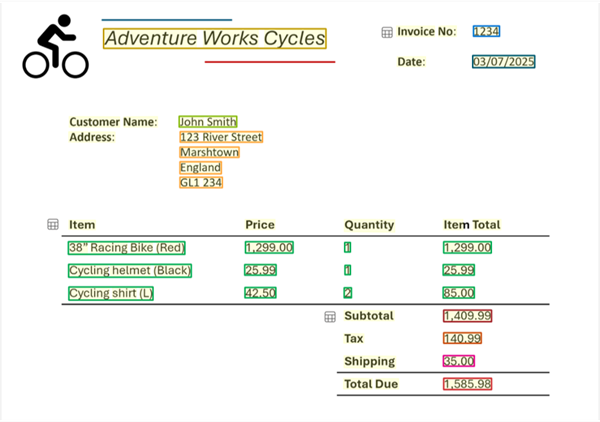
It will extract the fields with their nested values
- Vendor name: Adventure Works Cycles
- Invoice number: 1234
- Invoice date: 03/07/2025
- Customer name: John Smith
- Custom address: 123 River Street, Marshtown, England, GL1 234
- Items:
- Item 1:
- Item description: 38” Racing Bike (Red)
- Unit price: 1299.00
- Quantity ordered: 1
- Line item total: 1299.00
- Item 2:
- Item description: Cycling helmet (Black)
- Unit price: 25.99
- Quantity ordered: 1
- Line item total: 25.99
- Item 3:
- Item description: Cycling shirt (L)
- Unit price: 42.50
- Quantity ordered: 2
- Line item total: 85.00
- Item 1:
- Invoice subtotal: 1409.99
- Tax: 140.99
- Shipping Charge: 35.00
- Invoice total: 1585.98
Azure Content Understanding In Foundry
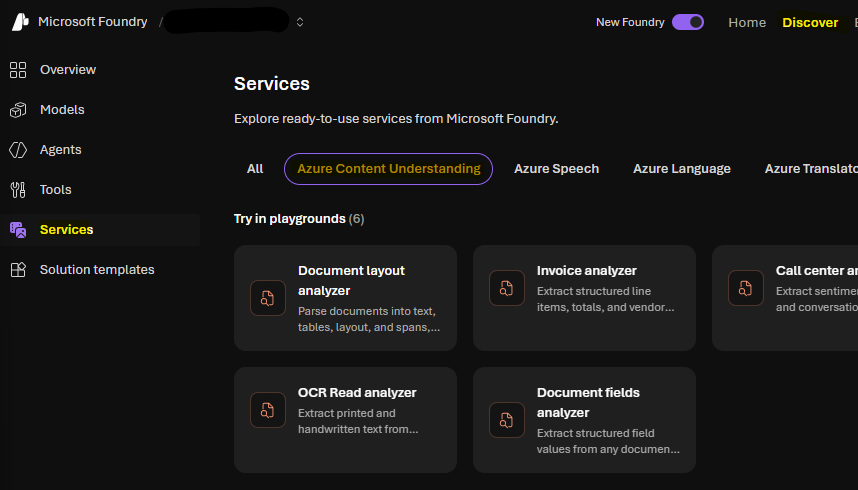
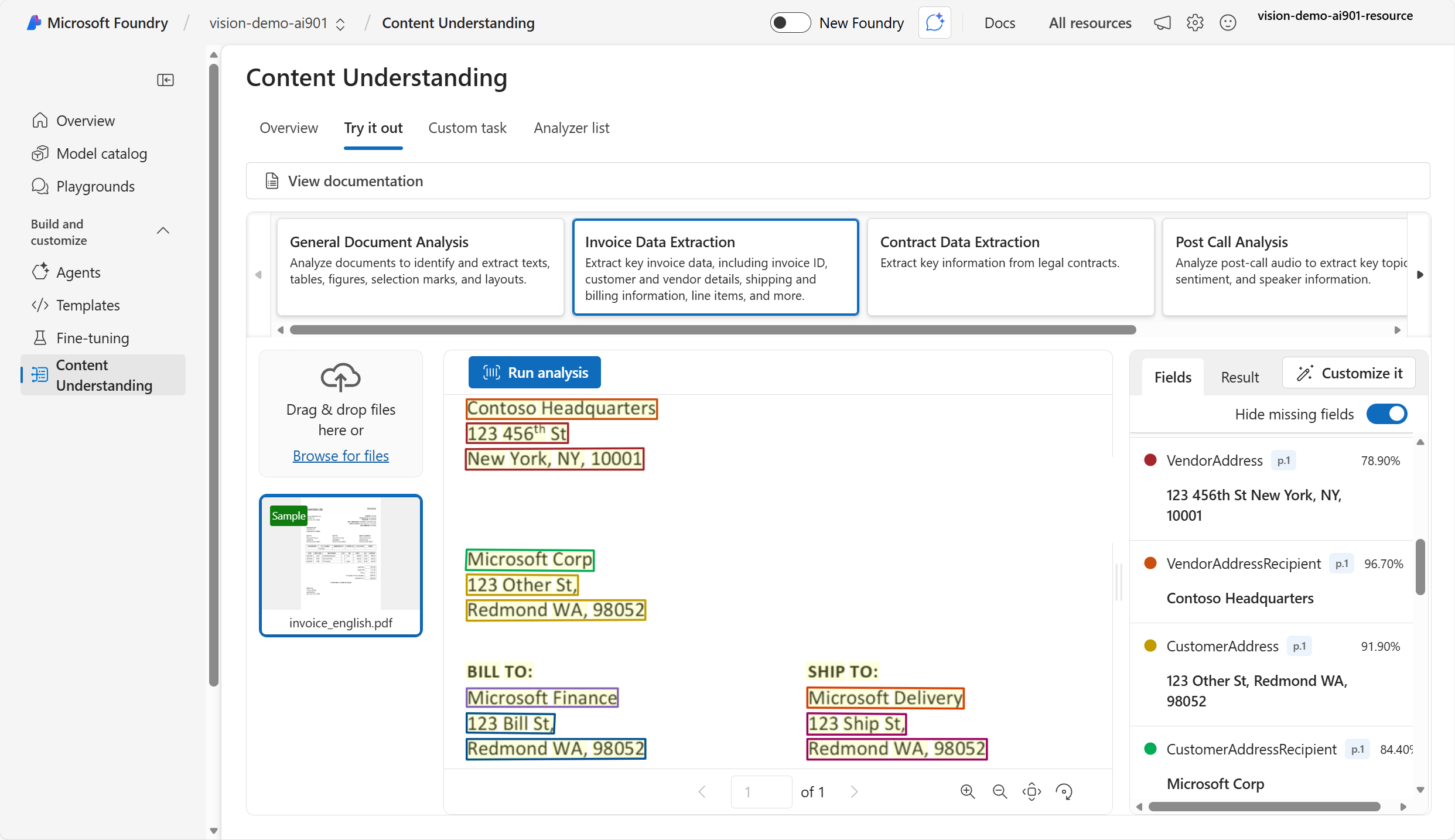
You candeploy ACU in Foundry in
Discover > Services > Azure Content Understanding
Azure Content Understanding SDK
Install
python -m pip install azure-ai-contentunderstanding
import os
from azure.ai.contentunderstanding import ContentUnderstandingClient
from azure.core.credentials import AzureKeyCredential

endpoint = os.environ["FOUNDRY_ENDPOINT"]
key = os.environ["FOUNDRY_KEY"]

client = ContentUnderstandingClient(endpoint=endpoint, credential=AzureKeyCredential(key))

# 1) start analysis with analyzer id + inputs
analyzer_id = "prebuilt-invoice"
inputs = [
    {"url": "https://github.com/Azure-Samples/azure-ai-content-understanding-python/raw/refs/heads/main/data/invoice.pdf"}
]

# 2) wait for the Long Running Operation (LRO) to complete
poller = client.begin_analyze(analyzer_id=analyzer_id, inputs=inputs)  # starts LRO
result = poller.result()  # waits for completion (polling handled by SDK)

# 3) read structured fields + markdown
# The result typically includes extracted "fields" and "markdown" per input content item.
for content in result.contents:
    print(content.markdown)
    print(content.fields)
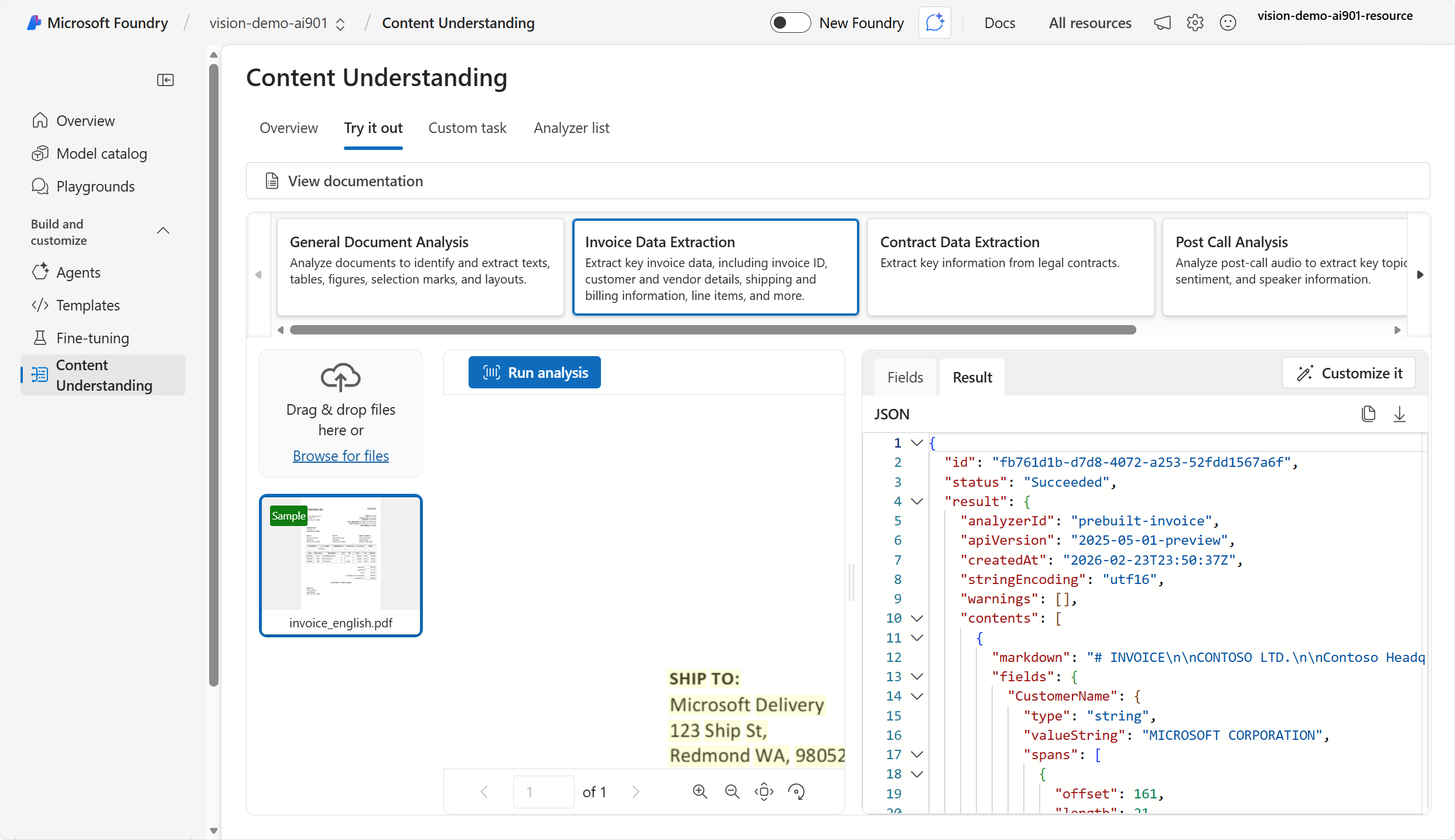
resulting output
{
	"status": "Succeeded",
	"result": {
		"analyzerId": "prebuilt-invoice",
		"apiVersion": "2025-05-01-preview",
		"contents": [
			{
				"markdown": "# INVOICE\n\nCONTOSO LTD.\n\nContoso Headquarters\n123 456th St\nNew York, NY, 10001\n\nINVOICE: INV-100\n\nINVOICE DATE: 11/15/2019\n\nDUE DATE: 12/15/2019\n\nCUSTOMER NAME: MICROSOFT CORPORATION\n",
				"fields": {
					"CustomerName": {
						"type": "string",
						"valueString": "MICROSOFT CORPORATION",
						"confidence": 0.95,
					},
					"InvoiceDate": {
						"type": "date",
						"valueDate": "2019-11-15",
						"confidence": 0.994,
					}
                }
            }
        ]
    }
}
Extract information from audio and video
Azure Content Understanding supports both audio and video files.
Extract structured data from audio
Azure Content Understanding provides transcriptions, summaries and other insights from audio files.
You define a schema
- Caller
- Message summary
- Requested actions
- Callback number
- Alternative contact details
Process a voice mail
(imagine this is an audio file)
Hi, this is Ava from Contoso.

Just calling to follow up on our meeting last week.

I wanted to let you know that I've run the numbers and I think we can meet your price expectations.

Please call me back on 555-12345 or send me an e-mail at Ava@contoso.com and we'll discuss next steps.

Thanks, bye!
Then Azure Content Understanding processes and gives us a response
- Caller: Ava from Contoso
- Message summary: Ava from Contoso called to follow up on a meeting and mentioned that they can meet the price expectations. They requested a callback or an email to discuss next steps.
- Requested actions: Call back or send an email to discuss next steps.
- Callback number: 555-12345
- Alternative contact details: Ava@contoso.com
Extract structured data from video
Azure Content Understanding also supports video analysis the same way. You give it a schema, process a video and it results the JSON
Process audio/video through SDK
import os
from azure.ai.contentunderstanding import ContentUnderstandingClient
from azure.core.credentials import AzureKeyCredential

# Endpoint and key for your Foundry resource
endpoint = os.environ["FOUNDRY_ENDPOINT"]  # e.g., "https://<resource>.services.ai.azure.com/"
key = os.environ["FOUNDRY_KEY"]

client = ContentUnderstandingClient(
    endpoint=endpoint,
    credential=AzureKeyCredential(key)
)

# Choose a prebuilt analyzer for audio
# (The documents module lists examples like prebuilt-audioSearch / prebuilt-videoSearch.)
analyzer_id = "prebuilt-audioSearch"

# Provide an input audio file (URL shown here; you can swap in your own accessible media URL)
inputs = [
    {"url": "https://<your-host>/samples/voicemail.wav"}
]

# Start analysis (asynchronous long-running operation)
poller = client.begin_analyze(analyzer_id=analyzer_id, inputs=inputs)

# Wait for completion (SDK polls under the hood)
result = poller.result()

# Inspect the structured output (JSON-like objects)
for content in result.contents:
    # Some analyzers may return a transcript and/or extracted fields depending on the analyzer and schema
    print("=== MARKDOWN / TRANSCRIPT (if provided) ===")
    print(getattr(content, "markdown", None))

    print("\n=== EXTRACTED FIELDS ===")
    print(getattr(content, "fields", None))