Text analysis es el proceso de extraer información útil de un bloque de texto no estructurado mediante NLP como puede ser:
- sentiment analysis (positivo, neutral, negativo)
- entities
- topics
Text Analysis in Microsoft Foundry
En Foundry tenemos dos aproximaciones para text analysis:
- modelos generalistas de IA con objetivos muy amplios mediante NLP
- Tools específicas que devuelven resultados deterministas para tareas muy específicas
Modelos de IA generalistas
Podemos usarlos directamente out-of-the-box para:
- Key phrase extraction: listar los conceptos principales
- Entity linking: identificar entidades y linkearlas a Wikipedia
- Sentiment analysis and opinion mining: identificar si es positivo, neutral o negativo
- Summarization: resumir la información principal
Los modelos generalistas se recomiendan cuando necesites aplicar varias de estas técnicas a la vez
Azure Language in Foundry Tools
Azure Language is a NLP service for specific text analysis tasks. These analyzers return structured, deterministic output - making them well-suited for automated pipelines where we want consistent results.
Azure Language capabilities:
- Language detection: evaluates text and detects language and dialect
- Personal Identifying information (PII) detection (also PHI - health information)
Language detection
given this text
¡Hola! Me llamo Josefo y vivo en Madrid, España
we would get
| Language | ISO 6391 code | Confidence score |
|---|---|---|
| Spanish | es | 1.00 |
PII detection
given this text
“Maria Garcia called from 020 7946 0958 and asked to send documents to 42 Market Road, London, UK, SW1A 1AA.”
we would get
| Text | Category |
|---|---|
| Maria Garcia | Person |
| 020 7946 0958 | Phone number |
| 42 Market Road, London, UK, SW1A 1AA | Address |
Use Azure Language with an Agent
AI agents use models as its brain to reason and plan, and they also use tools to perform tasks, which are added as MCP servers.
Model Context Protocol (MCP)
Open standard que define como se conectan los agentes de IA a tools externas y data sources. MCP es un universal adapter para poder conectar agentes a MCP servers que exponen unas capacidades de una manera standard.
MCP usa una arquitectura cliente-servidor
- El MCP client es el agente de IA que envía requests.
- El MCP server es el servicio que expone tools, datos o acciones.
Cuando un agente se conecta a un servidor MCP, puede descubrir que tools ofrece ese servidor e invocarlas como necesite.
Un MCP server puede responder a una petición:
- Providing data (give sentiment scores)
- Taking action (process a batch of documents)
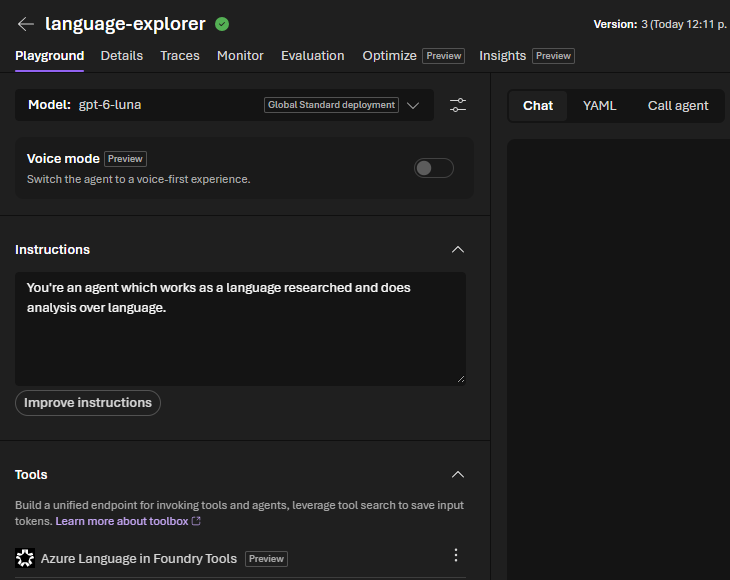
Build your agent in Foundry
Some regions may not be supported for some MCP servers. It happened to me with Azure Language MCP and Spain Central
- Deploy a model
- Create new agent
- Select the deployed model
- Give instructions to the agent
- Linked the previously created tools (Azure Language)
- Give a prompt and test
Client application to analyze text (python)
Let’s create an application that uses the OpenAI Python SDK. For that we need to have created before:
- a Foundry resource
- a Foundry project
Install the main library
pip install openai
Create a config file .env
AZURE_OPENAI_ENDPOINT=https://<your-resource>.openai.azure.com/openai/v1/
MODEL_DEPLOYMENT_NAME=gpt-4.1-mini
API_KEY=<your-foundry-key>
Create the app logic
import os
from dotenv import load_dotenv
from openai import OpenAI

# Load environment variables from .env file
load_dotenv()
endpoint = os.getenv("AZURE_OPENAI_ENDPOINT")
api_key = os.getenv("API_KEY")
deployment_name = os.getenv("MODEL_DEPLOYMENT_NAME")

# Create the client object
client = OpenAI(
    base_url=endpoint,
    api_key=api_key
)

# Make a request using the client
message = client.responses.create(
    model=deployment_name,
    input="",
)

# Print the results
print(f"Sentiment: {message.output[0]}")
Use the Azure Language SDK
Install it
pip install azure-ai-textanalytics
Adapt the config
AZURE_LANGUAGE_ENDPOINT=https://<your-resource>.cognitiveservices.azure.com/
API_KEY=<your-foundry-key>
App code for language detection
# Import packages
import os
from dotenv import load_dotenv
from azure.core.credentials import AzureKeyCredential
from azure.ai.textanalytics import TextAnalyticsClient

# Load environment variables from .env file
load_dotenv()
endpoint = os.getenv("AZURE_LANGUAGE_ENDPOINT")
key = os.getenv("API_KEY")

# Create the client
client = TextAnalyticsClient(endpoint=endpoint, credential=AzureKeyCredential(key))

# Make a request using the method for LANGUAGE DETECTION
text = "¡Hola! Me llamo Josefina y vivo en Madrid, España."
result = client.detect_language([text])[0]

# Print the results
print(f"Language      : {result.primary_language.name}")
print(f"ISO code      : {result.primary_language.iso6391_name}")
print(f"Confidence    : {result.primary_language.confidence_score:.2f}")
Or if we modify the method called, for PII
# Make a request using the method for PII
text = "Maria Garcia called from 020 7946 0958 and asked to send documents to 42 Market Road, London, UK, SW1A 1AA."
result = client.recognize_pii_entities([text])[0]

# Print the results
print("Redacted text:", result.redacted_text)
print("\nEntities found:")
for entity in result.entities:
    print(f"  {entity.text} | category={entity.category} | confidence={entity.confidence_score}")